Wednesday, 8 January 2014

Android Phone Fans

Android Phone Fans


Google Glass’s interface feel a little sloppy to you? This video shows some possible improvements

Posted: 08 Jan 2014 04:03 PM PST

While it would appear that everyone under the sun with a pair of Google Glass is enjoying it immensely, there are still some complaints that many feel need to be addressed before the product is ready for public consumption.

One of those problems is the user interface — it’s just clunky. Part of the problem is that the screen real estate doesn’t leave much room for sensible user interface design. Google employs a scrolling mechanism to give you access to all your things with the swipe of a finger, but having all of those things jumped up into one unorganized list is counterproductive (and makes for some very tired arms).

Serge Berig identified some of these shortcomings, and took it upon himself to present a proof of concept of a new user interface design that could help settle some of these issues. For instance, a folder/hierarchy system would make it easy to sort between photos, video and other multimedia. If all you want to see are emails, then you’d be able to dip right into email and nothing else. As it stands, there really is no easy way to drill down into a specific subset of items like you’d do with a smartphone app.

Some of his ideas might not be possible due to the limited space inside the projected heads-up display, but the debate isn’t whether this specific implementation will work.

google glass ui concept

The real purpose of the video was to show Google how they could think differently about the user interface powering Google Glass, because there won’t be a ton of consumers willing to buy a product that’s hard or confusing to use. Let’s hope top brass from the Mountain View company sees this (though we wouldn’t be surprised if they’re already working on new interfaces behind the scenes). Watch the video above.

[Thanks Jake!]

HP Slate 21 Pro brings an all-in-one Android PC for the business class [VIDEO]

Posted: 08 Jan 2014 02:42 PM PST

HP has come to CES with an new all-in-one PC that runs Android. It’s called the HP Slate 21, a 21-inch 1080p IPS desktop device with Android 4.3 Jelly Bean to start. It isn’t all that unlike the original Slate 21, but the “Pro” at the tail-end of this thing’s name means it’s aimed right at the business class. That means HP will be loading this thing up with software and services fit for anyone in the enterprise sector or in education.

Specifically, they’ll be preloading it with Kingsoft Office, Skype, Evernote, HP’s Classroom Manager, 50GB of storage from Box for life, and Citrix Receiver for remote controlling other Window PCs. Despite this being a “business” centric PC, HP says it could be used for a typical classroom setting, public kiosks (such as a business center inside a hotel) and other uses.

hp-slate-21-pro-3 hp-slate-21-pro-2 hp-slate-21-pro

For specs, it’ll feature NVIDIA’s quad-core Tegra 4 processor, an HD webcam, WiFi N, Bluetooth 4.0 and more. All of that comes with a cool price tag of just $399, which doesn’t seem bad at all if you can make this thing work for you. It’s available right now, but if you were looking for some hands-on time with this thing before taking the plunge you’ll be able to find it sitting above.

Write your break-up letter to AT&T, Verizon and Sprint using this tool T-Mobile provided

Posted: 08 Jan 2014 02:18 PM PST

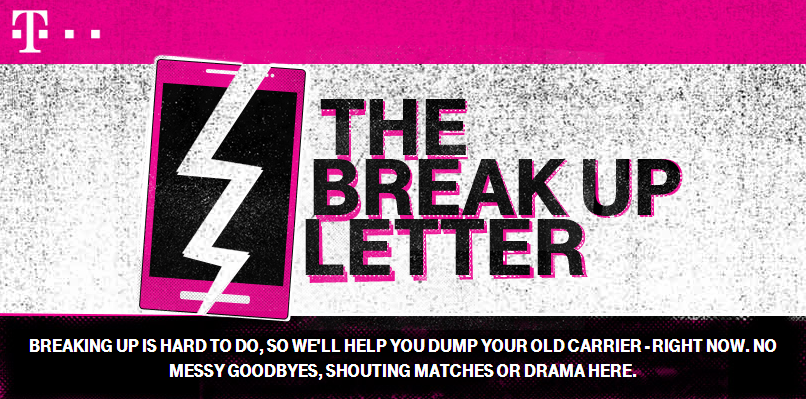
t-mobile break up letter

Need to write a tough break-up letter to your ex-carrier? Finding it hard to find the right words to use? Maybe T-Mobile’s break-up letter generator will help you do the trick. The company revealed it as part of their marketing strategy to promote a new incentive that will have them pay for your ETF fees if you switch to their network.

It’s simple:

  • Name your carrier
  • Choose the words that feel right for you
  • Get presented with a perfect break-up letter and share it with your friends on Facebook and Twitter

The end-result is what you see below (that’s if I ever had the nerve to leave Verizon):

quentyn break-up letter


Ready to try your own? All it takes is a few minutes on Facebook. Find it here and put your own break-up letter together. We’d love to see yours, so don’t be shy in posting yours in the comments section below!

T-Mobile announces 1.6 million net additions in Q4 2013; 4.4 million on the year

Posted: 08 Jan 2014 01:21 PM PST

T-Mobile-4G-LTE-featured-LARGE

T-Mobile has just announced some early numbers from their 2013 results. They revealed that the company brought in 1.6 million net customers in the foruth quarter of 2013. That number brings T-Mobile to 4.4 million net additions on the entire year, which they’ve announced makes them the fastest growing wireless carrier in America right now. T-Mobile also reminded us that Q4 2013 was their best 4th quarter in 8 whole years — yowza.

All of this came on the heels of an announcement that the carrier will now offer to pay the entirety of your ETF (up to $350) for up to 5 lines for porting your number over from Verizon, AT&T and Sprint. T-Mobile believes they’ve already done a ton to shake the industry up with the first three phases of un-carrier, and this growth milestone is definitely evidence of that.

But they feel they can go even further by allowing folks to break the chains from their current carriers without looking back and without regret. Un-carrier 4.0 is a good first step toward that, and it’ll be interesting to see how 2014 fares for T-Mobile now that there’s practically no excuse to not give them a shot.

T-Mobile announces “get out of jail free” cards for people who want to leave their carriers

Posted: 08 Jan 2014 12:55 PM PST

t-mobile-uncarrier

We’re sitting in on a very loose-mouthed press conference by T-Mobile CEO John Legere right now, where he aided the company in announcing their new “Get out of jail free” card. “Jail,” if you haven’t guessed it, is your commitment to other carriers under a contract that charges you to leave. So what will this “card” do for you? It’s simple: bust you out while  T-Mobile foots the bill.

To explain it deeper, T-Mobile says that an eligible phone trade-in plus the cost of paying your ETF could give you up to $650 for each line in total value for switching over. It’ll have to be from one of the big carriers, you will have to fork over your old phone to do it, and you will have to port your number, but you won’t have to pay a dime (and you might even be in for a little extra cash at the end of it all).

Starting tomorrow, customers from the three major national carriers who hand in their eligible devices at any participating T-Mobile location and switch to a postpaid Simple Choice Plan can receive an instant credit, based on the value of their phone, of up to $300. They then purchase any eligible device, including T-Mobile's most popular smartphones, now priced at $0 down (plus 24 monthly device payments, for well-qualified customers).

After customers get the final bill from their old carrier (showing their early termination fees), they either mail it to T-Mobile or upload it to www.switch2tmobile.com. T-Mobile then sends an additional payment equal to those fees, up to $350 per line. Trade-in of their old phone, purchase of a new T-Mobile phone and porting of their phone number to T-Mobile are required to qualify.

And it’s as simple as that. It’s nothing that we haven’t seen before, with other carriers offering similar deals for customers. The difference is that T-Mobile is planning on making this a permanent mainstay. It’s yet another of their bold moves that they hope will convince consumers that T-Mobile is the place to be. They’ve already managed to move 4.4 million new customers to their network in the past year, which makes them the fastest growing carrier in America right now.

OnePlus launches #NeverSettle wallpaper campaign for their OnePlus One CyanogenMod phone

Posted: 08 Jan 2014 12:16 PM PST

OnePlus site header

Just yesterday, we reported that the OnePlus startup will be launching their first phone later this year. Up first on the roster is a big one, the first CyanogenMod phone designed from the ground up to run CyanogenMod out of the box. Dubbed the OnePlus One, both companies aim to offer a perfect harmony between user experience and hardware, disrupting the smartphone industry in 2014. Seeing as we’re only just starting out the year, a device launching later this year could be a very long way off. The OnePlus team has something to tide us over for now and launched their #NeverSettle campaign.

Never Settle for a mediocre user experience. Never Settle for subpar hardware or software. Never Settle for a phone that is anything other than the very phone that you want. At OnePlus, the Never Settle movement is the impetus for the exacting performance and sleek design that will define the OnePlus One.

You can show your OnePlus pride by sporting the Lock Screen and Home Screen wallpapers below in full 1080p glory. Enjoy!

Lock Screen Home Screen

Source: OnePlus


This is what the Nokia Normandy’s Android-based user interface looks like

Posted: 08 Jan 2014 11:48 AM PST

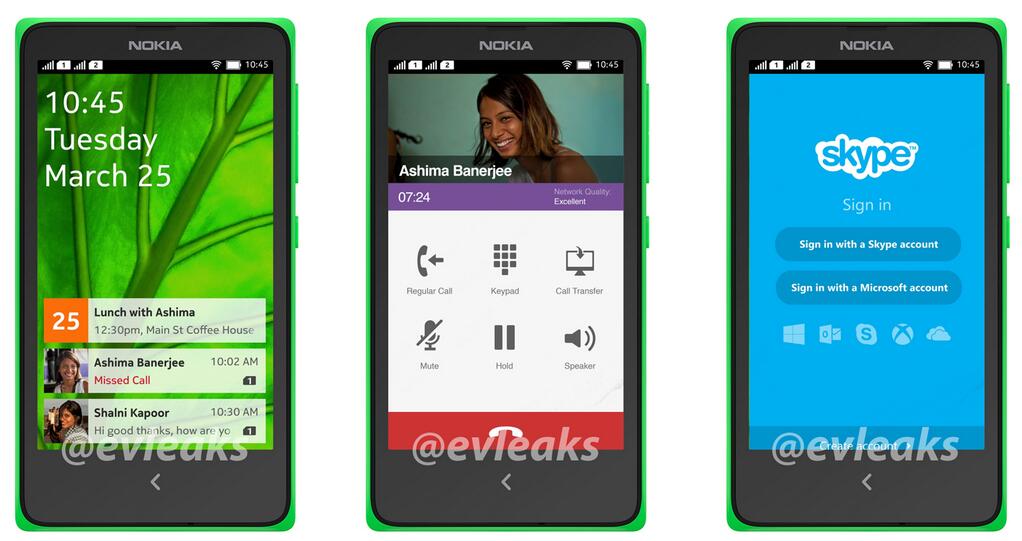
Wondering how the Nokia Normandy’s Android-based software would look if the Finnish company actually decides to launch it? This low-cost Android phone was leaked a while ago, and while we thought there was a slim chance of seeing it released after the sale to Microsoft, newer rumors suggest we might not have heard the last of it.

That must be true, as @evleaks has yet another leak giving us a peak inside this mysterious device. The Normandy’s apparent user interface can be seen in the photo above. What we’re seeing doesn’t immediately make it obvious that this is Android at first glance. The first slide shows what could be some sort of agenda / updates widget, showing you important details about meetings and missed calls.

nokia normandy android interface


The second is a typical dialer interface, though the “Regular Call” and “Call Transfer” options have us intrigued. It sounds like something that has to do with Skype integration. Imagine a feature that’ll allow you to pick a call up on your desktop and vice versa in a seamless way? Microsoft does own both Nokia and Skype, so it would sound like the perfect feature to flex those muscles with.

Finally, the last slide gives us a glimpse at the Skype login screen (which doesn’t look far off from what we already have on Android today). If there really is a snowball’s chance that this thing will launch, it’ll be interesting to see who and where it’s aimed. Earlier reports suggested the Normandy was meant for developing markets as a low-cost option for those who want a capable smartphone.

nokia normandy

If true, we’re not surprised to see Nokia wanting to go that route. The manufacturer once dominated the world in terms of entry-level handsets. They probably feel like they’ve lost their way a bit with their new focus on Windows Phone, so this could be the perfect way for them to break back into that market and try and reclaim some of the market share that Samsung, LG and others have stolen.

That said, we’d love to hear more than “maybe, maybe nots” when it comes to whether or not this thing will ever see the light of day. Let’s hope we hear more about that at some point down the line.

[via WinSource]

ZTE hotspot has Android, a tiny projector and a huge battery that can charge your phone [VIDEO]

Posted: 08 Jan 2014 10:37 AM PST

For most folks, a WiFi hotspot has to be small, simple, solid and effective. The biggest concerns are usually battery life and signal strength, and most OEMs tend to focus on that and nothing more. But ZTE took it upon themselves to change our train of thought on what a hotspot should be.

The little guy you see in the video above runs Android on a tiny display, giving you access to the operating system at 480 x 800 resolution. While color displays and light OSs on hotspots aren’t new, a couple of other elements on this bad boy is.

For starters, ZTE has chucked a projector inside, giving you a way to beam video content (any surface’ll do) at up to 120 inches in size. This could be great for showing a quick presentation on the go, though we’d understand it if you found difficulty finding tons of practical use-cases for this thing.

ZTE-Projector-Hotspot3 ZTE-Projector-Hotspot2 ZTE-Projector-Hotspot6 ZTE-Projector-Hotspot11 ZTE-Projector-Hotspot7 ZTE-Projector-Hotspot5 ZTE-Projector-Hotspot10 ZTE-Projector-Hotspot

This WiFi hotspot also has an insane 5,000mAh battery, which just sounds like a dream come true for a hotspot device. While that battery’s main use is to charge a smartphone using its built-in microUSB port, we’re excited about the prospect of all-day hotspot goodness alone. It’ll serve up 3G and 4G speeds whenever you need it, though that’s subject to carrier approval (we imagine they’d only help you out if they officially sold it themselves).

While everyone’s getting all googley-eyed over smart watches and connected cars this year, we’re secretly hoping that this WiFi hotspot forces others to come up with a solution that’s just as useful as this one should turn out to be. There’s a quick look at it above, and then you can let your eyes wander below for a sample of video playback through that projector.

ZTE Iconic Phablet hands-on [VIDEO]

Posted: 08 Jan 2014 09:38 AM PST

Have big hands? Want a ZTE phone? If both of those things are true, the ZTE Iconic Phablet might be the device for you. The Chinese company toted this big guy to Vegas with them for CES, so we did our due diligence in getting some hands-on time with it. The specs seem a bit underwhelming for a phablet at first glance:

  • Unspecified dual-core Qualcomm processor
  • 5.7-inch 720p display
  • 1GB of RAM
  • 3,200mAh
  • Bleutooth 4.0
  • 8GB of storage
  • 8 megapixel rear camera with LED flash
  • 1 megapixel front camera
  • Android 4.3 Jelly Bean

That said, it could still be a very capable device if the price is right. Our early look at this thing’s software shows a very bare-bones version of Android with light customization by ZTE.

One element of their user interface tweaks is a multi-pane apps feature, not unlike the multi-view feature of Samsung’s latest smartphones. This allows you to run two apps at the same time, and it gives you the freedom to adjust the viewing area of each app at a moment’s notice. It seems to work rather well, though there wasn’t much else immediately noticeable that takes advantage of that 5.7-inch screen real estate.

CDMA and GSM radios — plus LTE — inside suggest this thing could launch pretty much anywhere. While we don’t see the likes of Verizon or AT&T touting this as a heavy hitting device here in the States, we wouldn’t be surprised if someone like Virgin or Boost Mobile offered this up as an affordable biggie-sized phone for those who want a massive display. Guesswork only gets us so far, though, so we’ll wait for more availability details from ZTE before we start making assumptions. Find the hands-on video above.

Hands-on: ZTE BlueWatch smartwatch [VIDEO]

Posted: 08 Jan 2014 08:46 AM PST

Everyone wants to be in the smart watch arena, so we weren’t too surprised to learn that ZTE came to CES with a smart watch of their own. They’re calling this the BlueWatch, a Bluetooth 4.0 wrist-dweller that, quite honestly, doesn’t seem to do anything special.

The watch seems competently designed and should look stylish aside any ensemble of clothing you put on. The 1.26-inch x .38-inch e-Ink display will serve up the time, weather, Facebook, Twitter, texts, email and more, and will do it in varying lighting conditions. The e-Ink display also ensures the 235mAh battery isn’t taxed too heavily.

ZTE has implemented a simple 4-button user interface for easily scrolling through all the options, settings and apps you need, a relief considering touch-based e-Ink implementations are often more shoddy than helpful. ZTE also chose to forego a cable-based charging solution, instead opting for a 2-pin connector for charging the thing within a dock.

The BlueWatch honestly feels like one of those “you’ve seen one of them, you’ve seen all of them” devices. I can’t think of any one standout quality that would make me want to consider one of these over something like the Pebble. It’s a prototype, but unless ZTE goes back and erases the entire drawing board we don’t see much changing.

Price could be a determining factor, of course, but we’re not quite sure where the BlueWatch stands in that category just yet. There’s also no word on the when and where with this thing. The fact that it’s still in the early prototype stages means we shouldn’t be expecting it at any point within the next few weeks or months. In the meantime, grab yourself an early look at this thing in our hands-on video above.

CES 2014: We go hands-on with the ZTE Nubia 5S and 5S Mini [VIDEO]

Posted: 08 Jan 2014 08:46 AM PST

We ran into a couple of ZTE’s newest entrants in the Nubia line-up, with the recently revealed Nubia 5S and Nubia 5S Mini catching our attention quite handily. ZTE hasn’t always had the best reputation for quality smartphones, but they’re banking on these little guys (as well as a couple of other devices) to change all that.

ZTE Nubia 5S

Starting with the Nubia 5S, this upgrade brings us a slightly refreshed set of specs, the most notable of which being Qualcomm’s Snapdragon 800 processor sitting inside. It also has a pretty crisp 5-inch 1080p HD display for those who were wondering if ZTE would skimp on display quality for this one. Here’s a quick look at the full spec list:

  • Snapdragon 800
  • 2GB RAM
  • 13 megapixel rear camera with 4K video
  • 5 megapixel front camera
  • microSD cards up to 64GB
  • 2,300mAh battery
  • NFC
  • Android 4.2 Jelly Bean

We’re a little disappointed to see this thing still running on Android 4.2 Jelly Bean, but this should be one of ZTE’s top priorities when it comes to software upgrades down the line. Everything else looks quite good, though, with an insane 13 megapixel camera that can shoot 4K video on the back. That sensor is accompanied by a 5 megapixel sensor on the front, which is something you just don’t see on many smartphones.

One thing that really caught our attention with the Nubia 5S is its design. It feels like ZTE finally caught a groove in terms of engineering, and found a way to eliminate those ugly bezels for a more sleek look and feel. That’ll go a long way to presenting itself to potential smartphone shoppers looking for something different.

Nubia 5S Mini

What caught our eye even more effectively was the Nubia 5S Mini. I don’t know about you guys, but I’m having a hard time calling any phone over 4.3 inches “mini” in this day and age. We suppose it’s sensible, though, considering it is technically smaller than the aforementioned 5S. Here’s how it reads out in comparison:

  • 4.7-inch 720p display
  • Snapdragon 600
  • 2GB of RAM
  • 16GB of storage
  • 13 megapixel rear camera
  • 5 megapixel front camera
  • 2,000mAh battery
  • microSD card support
  • Android 4.2 Jelly Bean

That isn’t bad for a small phone, though. The negative connotation that usually goes with the term “mini” is starting to fade with each passing year, even though this particular phone is as big as some of 2013′s flagship devices.

Nubia 5S and 5S Mini Software

Both these things run Android 4.2, though not without ZTE’s own custom UI tweaks running beside it. ZTE has put a heavy emphasis on customization and themeing, allowing folks to change the look and feel of the device to their taste. ZTE also surprises us with a pretty robust suite of camera features, even if the software was acting a bit wonky in our quick testing.

Both of these devices are headed for the Chinese market soon, but we wouldn’t hold our breath to see it go much further than that. You can find our hands-on video above, so take a look if you want to get more up-close and personal with them.

Gizmo's Freeware: How to Make Dozens of Tweaks to Windows 8 and 8.1 the Easy Way

Gizmo's Freeware: How to Make Dozens of Tweaks to Windows 8 and 8.1 the Easy Way

Link to Gizmo's Freeware: Top selections

How to Make Dozens of Tweaks to Windows 8 and 8.1 the Easy Way

Posted: 07 Jan 2014 07:31 PM PST

There are hundreds, maybe thousands, of ways to tweak Windows and everybody has their favorites. Here's an easy way to make many of your favorite tweaks in Windows 8/8.1 and possibly discover some new ones as well.


http://www.techsupportalert.com/content/how-make-dozens-tweaks-windows-881-easy-way.htm

Tuesday, 7 January 2014

Android Phone Fans

Android Phone Fans


Yahoo buys contextual Android launcher Aviate

Posted: 07 Jan 2014 06:30 PM PST

Aviate

Yahoo announced today that they have acquired Aviate, a popular replacement Android home screen launcher. Aviate is by far one of the most impressive launchers on the Google Play Store, mainly due to the app’s contextual nature. In fact, many users have called Aviate the Google Now of launchers, since Aviate provides you with the right applications and home screens at the right time.

Aviate tracks your usage patterns and automatically categorizes applications you use on your Android phone based on context such as WiFi, GPS, time of day, or accelerometer. Through this learning nature, Aviate automatically gives you a home screen and apps, called a space, that fits your needs whether that be at home in the morning, driving, at work, or at home in the evening.  The more you use Aviate, the better it gets, automating your Android experience.

Yahoo seems to be going strong in the mobile space in 2014, adding Aviate to their arsenal is a smart choice. Yahoo plans to continue improving the launcher, but hasn’t announced any integration with existing Yahoo services or apps.

If you signed up for the Aviate private beta, the below email might be sitting in your inbox. Have no fear. Thanks to the Yahoo acquisition, the first 25,000 people to use the code “YAHOO” can give Aviate a try.

Avite Invite

Download Aviate on the Google Play Store.

Source: Yahoo!

Corning Gorilla Glass microbial test shows cleanest Phandroid staffer has dirtiest phone [VIDEO]

Posted: 07 Jan 2014 05:11 PM PST

Yesterday, Corning announced a new version of Gorilla Glass that is infused with antimicrobial solutions that will help keep your smartphone free of germs and bacteria. We were wondering how Corning would “demo” this technology at CES, so we just had to stop by their booth to check it out. It wouldn’t be right if our resident germaphobe Chris Chavez didn’t go along, so he and Rob Jackson trotted over there to check it out.

To put it simply, Corning used an industry-standard microbial test that is often used to check contamination levels of restaurants in health safety checks. They simply swabbed the phones’ displays with cotton swabs to gather up the bacteria and mixed it with a solution that can be read by a machine. The result?

Chris Chavez, who can’t touch as much as a doorknob without an immediate urge to wash his hands afterward, had a Nexus 5 that scored a 475, which is seen as moderate for a smartphone. We weren’t sure how that fared up against some of the other results, so Rob Jackson wanted to throw his Galaxy Note 3 down and see how it compared.

Interestingly enough, Rob’s phone came back as a 57, which apparently means it’s cleaner than most smartphones out there. That sort of discrepancy just goes to show that you can be as clean as soap and still be exposed to tons of germs.

I guess that’s the reason Corning found the need to develop something like this. The company claims that the glass’s antimicrobial properties will last for the duration of your smartphone’s life cycle. This is made possible thanks to the ionic silver used in the compound, an agent that allows the glass to be as clear and durable as other reinforced glass.

It’d be interesting to see follow-up tests on phones with this sort of glass after a few months of rigorous use. We’re not sure when to expect the first smartphones with this material, but we suspect it won’t take long for manufacturers to pick up on it and yet another marketing bulletpoint for future devices. Be sure to take a look at the big germy showdown in the video above.

TrueSmart smartwatch demo with Omate CEO

Posted: 07 Jan 2014 04:48 PM PST

omate-truesmart-3

Many of you know I am obsessed with smartwatches. Actually, I am obsessed with the idea of a smartwatch, but I haven’t found one that is made right. Smartwatches always seem to have some kind of downside – could the Omate TrueSmart break this trend?

We stopped by the Omate booth at CES 2014 and got some good time with the CEO. He gave us an overview of the device and its features. Check it out:

I suppose what I like the most is that this is a full Android device. It is not smartphone-dependent and you can just stick a SIM card in it to use it as your phone. In addition, the user can also connect it to any smartwatch and get all the features the TrueSmart offers.

Omate TrueSmart specs

  • 1.3 GHz dual-core Cortex A7 processor
  • Android 4.2.2
  • 1.54-inch TFT display (240 x 240)
  • Multi-touch Capacitive Touch Screen
  • 2G/3G/WiFi/bluetooth 4.0/GPS
  • 5 MP camera
  • Speaker & microphone
  • 512MB + 4GB of internal storage (expandable by microSD 8/16/32GB)
  • Micro SIM card slot
  • 600 mAh battery (up to 100 hours standby)
omate-truesmart-4 omate-truesmart-1 omate-truesmart-3 omate-truesmart-2 omate-truesmart-5 omate-truesmart-6

The TrueSmart will be released later this year. You can already pre-order it for as low as $250 from the Omate site. Check out the video and stay tuned for more in the future! We plan to review this bad boy.

What do you think? Is the Omate TrueSmart the smartwatch for you?

Is Samsung’s new tablet UI a rip-off of Windows Metro UI? [POLL]

Posted: 07 Jan 2014 03:41 PM PST

samsung-magazine-ux

You might have noticed that Samsung is using a new user interface for their Magazine UX on the latest Galaxy tablet devices (hands-on of which we have right here). We didn’t want to say anything before, but it looks like the word got out — it looks quite familiar. We’re talking about a light hint of Microsoft’s Metro UI used in Windows 8+ devices.

While it’s clearly not exactly the same, you have to wonder if Samsung borrowed some design elements from Microsoft to craft this new user interface. Our friend Joe from WinSource suspects Samsung did it to create a product that lends itself more to the business users that the latest Galaxy TabPro and Galaxy NotePro tablets are catered toward.

While no one can say for sure, we’re sure everyone has their own opinion. Personally, I think Samsung did borrow a bit from Microsoft, though they obviously used the power and flexibility of Android to create an experience that’s more useful than that of default Metro. Most of all, though, I think I’m just glad that they aren’t interested in trying to emulate Apple (though some supposed upcoming changes to TouchWiz seem to suggest they’ve dipped back into that trend for the phone side of things).

How about you? Drop a vote in the poll below, and let us know your thoughts in the comments section right afterward.

Eyes on the new Polaroid Socialmatic Android camera with instant film on board

Posted: 07 Jan 2014 03:31 PM PST

Polaroid-Socialmatic-1

At the kickoff of CES Polaroid announced a new Android-powered camera dubbed the Socialmatic, which we quipped looks a lot like the Instagram icon. That’s no accident. It’s the first camera from the famed company to combine an Android interface with Polaroid’s instant film. With the Socialmatic, you can get a true washed-out Polaroid print while retaining the original image to share via whatever Android app your heart desires.

The filters of apps like Instagram and Hipstamatic stem from and were inspired in part by Polaroids iconic lineup of instant cameras. The Socialmatic brings things full circle.

Polaroid-Socialmatic-3

The Socialmatic’s 14MP sensor (and 2MP front-facing camera) routes images to the camera’s internal 2×3 ZINK printer as well as a 4.5-inch touch display, where a full build of Android Jelly Bean holds things down. Images can further be manipulated through apps and shared over the cameras built-in WiFi. Polaroid was also showing off an array of accessories, from customizable front plates to vintage-inspired cases and shoulder neck straps, all of which fit the vibe and looked pretty great.

As the camera is still getting the finishing touches before it launches this fall, we only eyed the Socialmatic from behind a panel of glass. We can’t speak for what looks to be a potentially awkward, clunky form factor for toting around on the daily, but as a novelty act it should do just fine. It’s mix of retro looks, old-school prints, and modern Android technology definitely show promise.

Polaroid-Socialmatic-5 Polaroid-Socialmatic-2 Polaroid-Socialmatic-4 Polaroid-Socialmatic-3 Polaroid-Socialmatic-1 IMG_5111

Laugh if you want, but TREWGrip’s accordion-style tablet keyboard could be productivity heaven

Posted: 07 Jan 2014 02:51 PM PST

The TREWGrip keyboard will catch your eye immediately. It’s definitely not slim or svelte. It’s somewhat large, has an accordion-like form factor, and looks unlike other products on the market. If you’re the type of person that theoretically likes tablets, but in reality prefers laptops at every turn, TREWGrip might win you over.

The TREWGrip is described as a “Rear-Type” keyboard, meaning the keys are actually on the back of the device.

trewgrip-back

On the front of the device you see indicators for what keys are on the flip side, and when pressing an actual key, the indicator on the front will illuminate to confirm (or deny) that you pressed the right button.

TREWGrip

The middle area is where you dock your tablet, via suction. Hopefully they’ll improve this function before launch since it didn’t seem flawlessly sturdy and all it takes is one drop to break your device. It also would only fit a smaller tablet and not a larger, 10-inch tablet; incorporating a slide to increase or decrease the width of the tablet dock would be helpful (similar to the PhoneJoy gaming controller).

TREWGrip touts that the learning curve for their keyboard is very low, allowing you to achieve 80% typing speed of your normal QWERTY Keyboard after only 8 to 10 hours of use and familiarity. It’ll vary from person to person, but supposedly it typically allows more Words Per Minute typed than Swype and has even lower barriers to productivity.

The TREWGrip is cool, but would I actually buy it? I’m not sure. But I’m not sure that matters. I’m a typical consumer who works from home and sits in front of my keyboard, with dual monitors and a nice big QWERTY, 80% of my day. Where I can really see the TREWGrip making an impact is for field agents who need to be productive while standing and working.

  • Retail employees in stores like Verizon Wireless or AT&T
  • Nurses and doctors going from room to room, patient to patient, but who need portable productivty
  • Comcast employees in the field or any other agents that make house calls
  • And the list goes on

I may not have otherwise considered this “in the field” approach, but seeing our demonstrator dock the TREWGrip keyboard on his hip definitely flipped the light switch.

TREWGrip Founder

As with all startups and emerging tech companies, time will tell if it sticks and succeeds. Their chances will largely rely on a successful launch, which will occur in the coming months. The company is still considering the merits of either attracting investors or launching a KickStarter campaign. Whichever route they go, we wish them the best, and we’ll make sure to keep our readers up to date with their latest endeavors.

Check out the company and follow their latest news at TREWGrip.com.

Sprint adds 6 new Spark markets, introduces “Framily” plan that gets cheaper with more people

Posted: 07 Jan 2014 02:34 PM PST

Sprint has announced that they’ve lit up 6 new markets with Sprint Spark upgrades, which brings their 4G LTE on new wireless spectrum that offers better building penetration and improved speeds. The six markets you can find new speeds in are Dallas, Austin, Fort Worth, Houston and San Antonio, Texas, as well as Fort Lauderdale, Florida. That brings us up to 11 markets with speeds up to 60 megabits per second.

Sprint-Logo

While Sprint’s roster of Spark-enabled devices is thin right now, you can expect the carrier to outfit most of their future smartphones with the radios. We already know that a Spark-equipped LG G Flex is coming, and Sprint also announced plans to relaunch the Samsung Galaxy S4 with Sprint Spark inside. In addition to those phones, there are a number of mobile hotspot and USB modem devices with the functionality already.

With that, Sprint also introduced a new “framily” plan. Nope, not a typo. The “Framily” plan will give you the ability to get a cheaper bill as you add more people. Folks will start out at $55 alone, but the plan gets $5 cheaper for each member that signs up (though you’ll be capped at $30 in savings at some point). Each line is billed individually, and each line has its own set of data plans and services.

For one line of service, new Sprint customers pay $55 per month per line for unlimited talk, text and 1GB of data. For each additional new Sprint customer that joins the Framily group, the cost per person goes down $5 a month up to a maximum monthly discount of $30 per line. Build a group of at least seven people and everyone gets unlimited talk, text and 1GB of data for $25 per month per line (pricing excludes taxes and surcharges).

All members of the group can customize their plan to meet their unique needs. For only $20 per month per line, Framily members can buy up to unlimited data plus get a new phone every year. Plan members can share the savings, without the hassle of sharing a bill. Each account can be billed separately. Unlimited features are while on the Sprint network.

For an example, Sprint says someone on a 7-line framily plan can pay as little as $25 per month for unlimited talk, texts and 1GB of data. Comparable plans on T-Mobile, AT&T and Verizon cost $50, $70 and $90, respectively.

Those savings are pretty steep, though it’ll be tough for a lot of people to find that many folks to share a plan with and get maximum savings. With T-Mobile forcing the competition to step up and provide people with the services they want for the prices they want, we should see more carriers make moves like this in the future.

Samsung’s bike protoype can dock and charge your Galaxy device [VIDEO]

Posted: 07 Jan 2014 02:07 PM PST

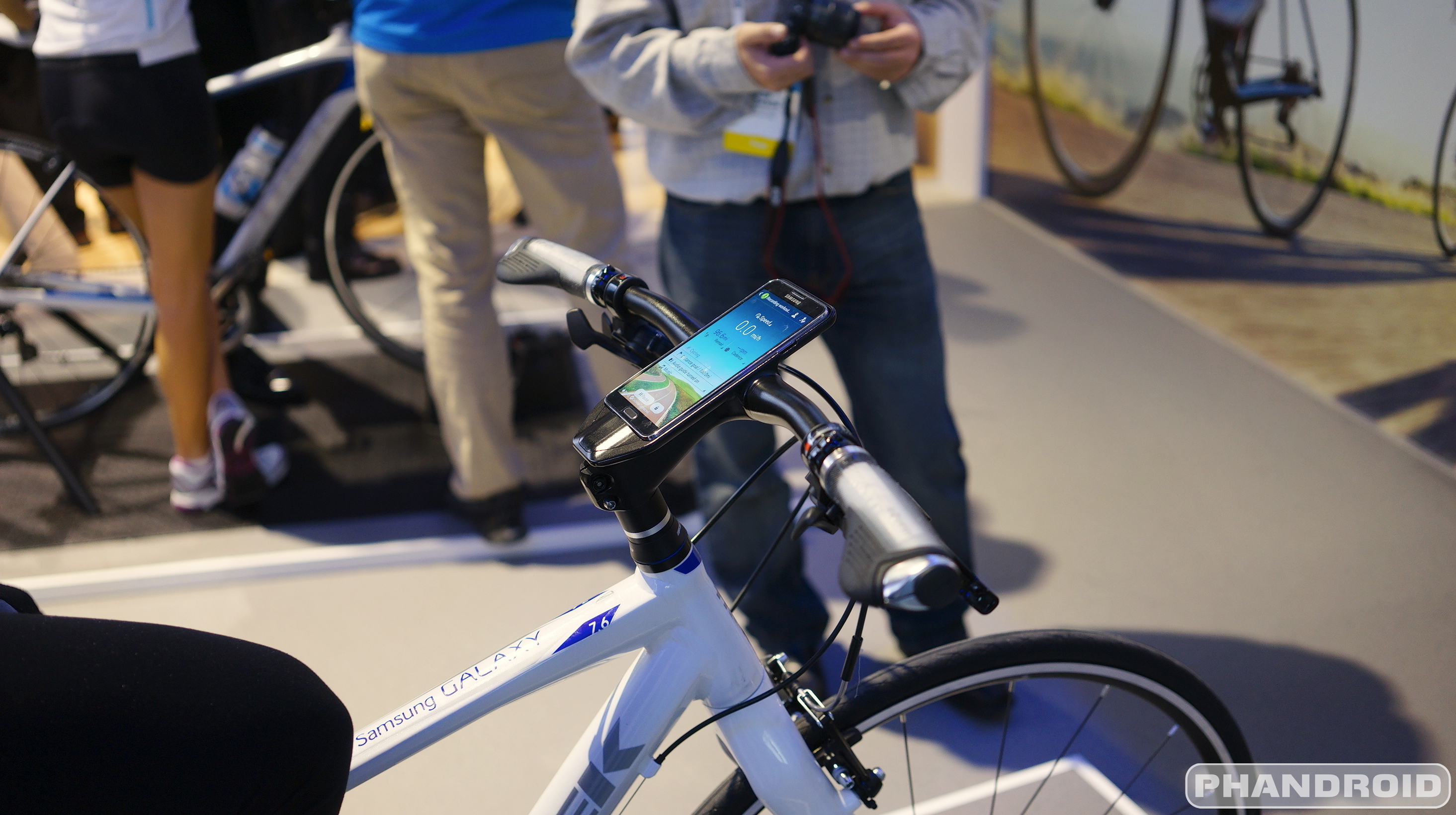
Samsung Trek Bike Domane 6 Series Note 3 Gear

It’s the first day of CES and Samsung’s booth was packed from the windows to the wall with looky-loos trying to get their mits all over Samsung’s upcoming wares. We just gave you guys a hands-on with the Samsung Galaxy Pro tablets, but for the more active types, we were able to get a short glimpse at Korean manufacturer’s upcoming bicycles. Yes, folks — bikes… sorta.

Samsung Trek Bike CES 2014

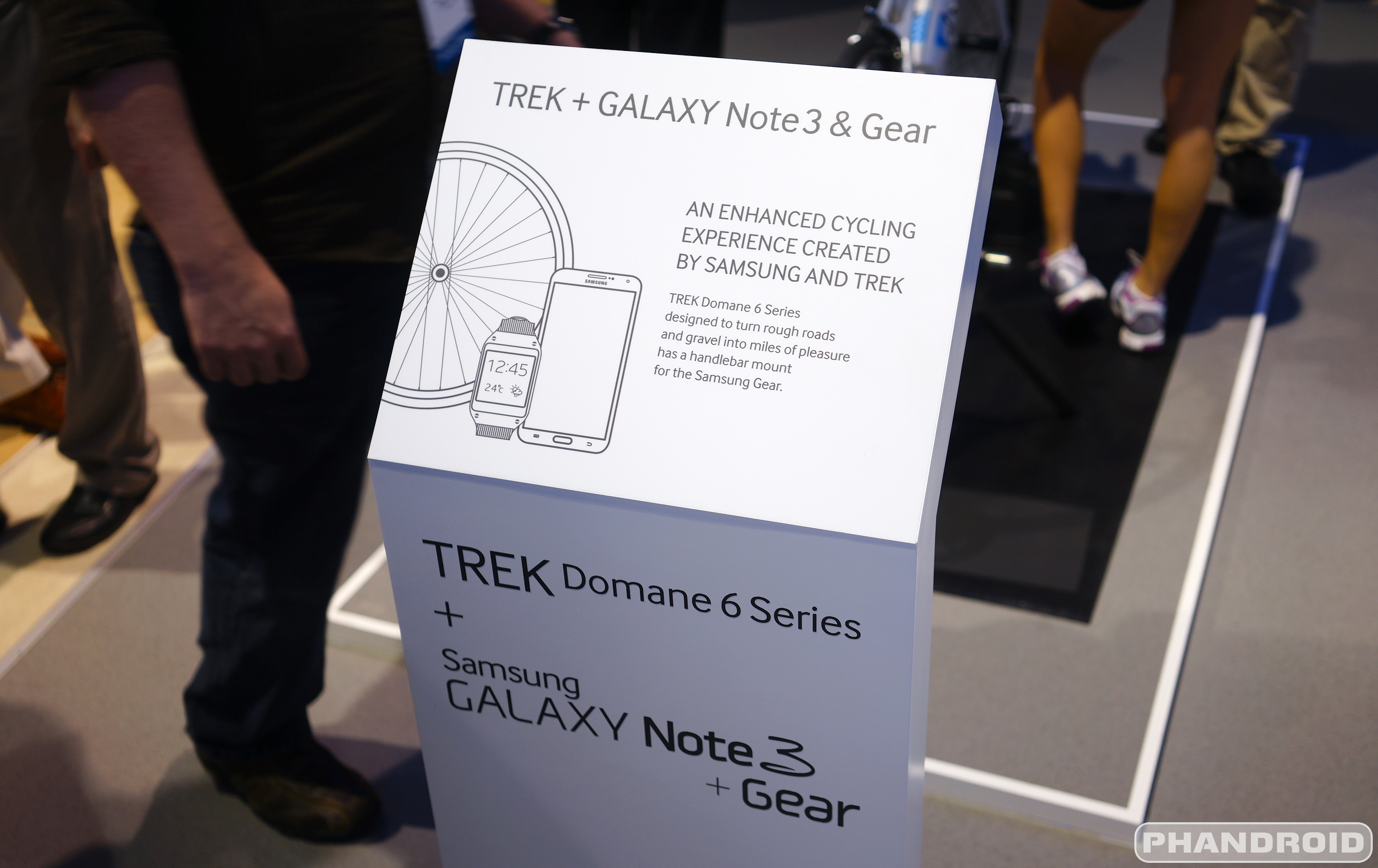
In a partnership with Trek Bikes, Samsung looks to make bicycling just a little more smartphone friendly utilizing built-in handlebar docks for their popular line of Galaxy devices. Shown off in 2 prototype bicycles, Trek was able to design one bike with, not only a dock for the Samsung Galaxy Gear, but even pairs up with the wearable to track the rider’s vitals, speed, and various other biking data.

Samsung Trek Bike DSC05175

The other bicycle on display featured a Samsung Galaxy Note 3 dock and a special charger in the front wheel to keep your device juice up while you ride. Pretty genius when you think about it, especially for those going on long bike rides while streaming music, using GPS, Maps, etc..

DSC05173

Still in the concept stages, Samsung mentioned these weren’t even the final design, let alone commit to any kind of release date. This was merely a sneak peek at the future of biking, brought to you by none other than Samsung. Stay tuned for more CES 2014 coverage as it unfolds!

Hands On: Samsung Galaxy NotePRO 12.2, Galaxy TabPro 12.2 and all its little brothers [VIDEO]

Posted: 07 Jan 2014 02:05 PM PST

Samsung had a bunch of great announcements at CES this year ranging from new washers, dryers, and cooktops to ultra clear big screen TVs with bendable displays. Of the new products showcased, several have Android, including four brand new “Pro” tablets dubbed the Samsung Galaxy TabPro and Samsung Galaxy NotePro.

All these new devices and so much to remember, let’s try and simplify things a bit. Of primary importance is the reason Samsung calls these devices “Pro”: they’re top of the line, cream of the crop devices with the premium specs targeting power users. All four of the new “Pro” devices have the following specs in common:

  • WQXGA (2560 X 1600) Super clear LCD
  • 8MP camera, 2MP front camera
  • Android 4.4 KitKat
  • IR Blaster

The four different devices are:

  • Galaxy TabPRO 8.4
  • Galaxy TabPRO 10.1
  • Galaxy TabPRO 12.2
  • Galaxy NotePRO 12.2


Samsung Galaxy Pro comparison size DSC05096Samsung Galaxy Pros size comparison DSC05097

Sitting on top (for comparison purposes) is the 5.7-inch Galaxy Note 3.

The obvious difference is in the size, with specs also nudging upwards with each increase. The TabPRO 12.2 and NotePRO 12.2 are essentially the exact same device, except the NotePRO 12.2 includes the Samsung S-Pen Stylus, and will likely cost more for exactly that reason. Pricing and availability is still TBD.

The first reaction is to look at the 12.2 inch behemoth’s and be blown away, and for good reason. But first, note how small and compact the Galaxy TabPRO 8.4 is and consider its WQXGA (2560 X 1600) Super clear LCD display. As far as we know, that’s the most pixel dense display for a tablet in its class on the planet. It’s beautiful. It’s impressive. Its worth staring at for a few minutes.

Samsung Galaxy Tab Pro 8.4 DSC05087


DSC05086

Make no mistake, though, the 12.2 inch TabPRO and NotePRO are where the real “new’ stuff is found: we haven’t seen a mainstream tablet of this size, ever. And despite what other manufacturers may argue, “mainstream tablet” currently means iPads, Galaxy Tabs, Kindles, and Nexii.

It’s unashamedly humongous which, like any device, comes with ups and downs. On the bright side, the device is so humongous that typing on a full screen keyboard is like being in your office and 4-window multi-tasking is a thing of beauty. On the down side, laying in bed and watching a movie could cause a hernia. I kid, of course, and when put into perspective consider that the 12.2 inch pro devices are almost as light as the original Motorola XOOM which it has essentially lapped twice in the spec race (1.65 pounds).

Samsung Galaxy Note Pro DSC05107

Samsung Galaxy Tab Note Pro DSC05106

As seen in the video above, some of the TabPRO and NotePRO features that are especially enjoyable are the 4-window multi-tasking, large keyboard layout, the Hold CTRL + A/X/C/V for select all, cut, copy, and paste (which surprisingly I haven’t seen on a tablet before). Then you’ve got the “Magazine Layout”.

Pick up your tablet for the first time and you’re immediately welcomed by a very “happening” layout filled with widgets of all types and sizes. One page is for personal “stuff”, one for entertainment, and one for productivity. The widgets can be moved and resized to fit your needs. Unfortunately, many users may feel their “needs” are to completely remove the magazine layout and stick with the traditional Android homescreen, which isn’t an option.

Samsung Galaxy Tab Note Pro DSC05101

I’m a bit surprised Samsung included this Magazine View on their Pro devices for a couple reasons:

  • As seen on many Galaxy S4 and Note 3 Reviews, the optional Flipboard magazine experience accessed by pressing the home screen from the home screen was disliked by many. Making it the default is a bit gutsy.
  • I associate the word “Pro” with power user and productivity and magazine layouts seem more consumer oriented and entertainment focused

But I’m not one to judge. I had these devices in my hands for less than an hour and, especially for the 12.2-inch form factor, real world use for a week or two is paramount to pinpointing it’s pros and cons. Hopefully we’ll be able to do exactly that for you in a full review when the Galaxy TabPRO and Galaxy NotePRO become available.

Watch Samsung announce the devices at their CES 2014 press event in the video below:

Take a look at all the Galaxy TabPRO and Galaxy NotePRO spec comparisons here!

Motorola to make big announcement for Europe next week; Moto X overseas?

Posted: 07 Jan 2014 01:27 PM PST

phphponv2

Pretty much everyone outside of America is sick of hearing how great the Moto X is without the ability to actually purchase one. That might be changing soon, though, as the company has started sending invites to European press for a big announcement on January 14th. It could be anything, but we’d find it hard to believe that Motorola would specifically point Europe out for anything other than their best phone yet.

For what it’s worth, Motorola did once mention that they would be looking to bring Europe a phone from the same “family” of devices when they were questioned about the lack of global availability for the Moto X. We can take that to mean that even if what we see next week isn’t a Moto X, it should come with a lot of the same features courtesy of the Motorola X8 Computing System. That would include Touchless Controls, Active Notifications and more.

Of course, our guess is as good as anyone’s, so we’ll leave it up to Motorola to dish out the official details once they hold their press event next week. Any of you European folks excited for Motorola to finally bring something your way?

[via Pocket-lint]

BMW and Samsung tag team vehicular connectivity with i3 and Galaxy Gear combo

Posted: 07 Jan 2014 12:50 PM PST

This is a landmark year for automotive at CES with the announcement of the Open Automotive Alliance, but it’s founding members aren’t the only ones getting in on the action. Samsung and BMW have teamed up with a CES showcase to illustrate how their Galaxy Gear – Samsung’s smartwatch – can connect to the BMW i3 electric car to improve driver experience.

BMW touts the i3 as  ”the world's first fully connected electrically-powered car” and it includes an integrated SIM. By connecting the Galaxy Gear to the car, drivers or passengers can quickly access important information about the vehicle such as remaining gas and how many miles can be driven, whether windows are up or down, doors are open or closed or locked or unlocked, and a whole lot more.

It doesn’t stop at reporting data from the car; users can also send commands to the car, both through tap commands on their Galaxy Gear and through voice commands using the latest Samsung S Voice features.

BMW i3-1

One handy feature is initiating the horn on your car. Maybe you’ve returned from a trip or shopping excursion and can’t remember where you’ve parked your car. Simply tell your BMW to make some noise through your Galaxy Gear and it will alert you to its location. Pretty handy!

I’m a bit torn between the practicality for a few reasons, but the usefulness of this combination will depend on if you are or are not a smartwatch type of person. Sure, you could access the exact same information on your phone, but the Galaxy Gear is already on your wrist and (I would think) much less of a distraction. Not to mention, you don’t have to unlock the Galaxy Gear to interact with the BMW i3 app (as you might have to on your phone).

You can even go so far as to change the temperature of your car in anticipation of driving it, never having to freeze while waiting for your heat to get going or sit smoldering on black leather while you wait for the car to cool down. Have your Gear and i3 fix this in advance!

BMW i3-3

Expect to see a lot more solutions that have smartphone, wearable tech, and automotive working in harmony to create synergistic experiences in the coming few years. And be warned, they’ll probably come with even more buzz words than the previous sentence.

Would a connected car be at the top of your check list when deciding to purchase your next vehicle?

Wetley creating custom-fit prescription lenses for Google Glass for $150

Posted: 07 Jan 2014 12:42 PM PST

One firm doesn’t seem keen on waiting for Google to bring out a consumer-ready version of Google Glass before they begin offering custom lens services. Wetley has announced that they are creating custom frames and lenses for Google Glass that will allow prescription eyewear users to use Google Glass and, well, see at the same time.

wetley-google-glass-frames-lenses

The solution is a snap-in frame that attaches to Glass in a way that makes it easy and natural to use. You have a couple of different options for getting your Google Glass tricked out:

  • Pay $100 for the clip-on frame, and find a lens cutter willing to cut for it
  • Pay $150 for the clip-on frame and lens from Wexley themselves

Many people will likely opt for the Wetley-cut option for the sake of convenience. Their lenses are crafted out of a strong polycarbonate and coated using Crisal anti-reflective solution for an optimal viewing experience.

Folks interested can head to OpticsPlanet.com to order it. You’ll have to wait about 2-3 weeks for your order to be fulfilled, but we can’t imagine many will complain about that with so few options available as it is.

Hands-on: Fuhu Nabi DreamTab line-up [VIDEO]

Posted: 07 Jan 2014 12:05 PM PST

IMG_0249

When it comes to kids tablets, Fuhu is one brand you can’t help but mention. Fuhu makes some of the most recognized kids tablets; with content, features and specs that will tend to make parents very comfortable. A third iteration would only make sense, but Fuhu is not being conservative with the Fuhu Nabi DreamTab!

The company has partnered with DreamWorks to bring awesome content to this device. Kids will be able to enjoy games, education exercises, drawing activities and more. Parental controls are included, of course. The DreamTab series comes with Android 4.4 KitKat and a special app store for kids.

Specs are moderate, but we must remember what market Fuhu is aiming to cater to. Another great feature is that the tablets are said to be easily repaired.

Check out the video to learn more! The tablet will be available later in 2014 for “under $300″. Not the cheapest if you ask me. What do you think?

InMotion’s SCV is a Segway competitor for half the price (with an Android-connected app)

Posted: 07 Jan 2014 11:58 AM PST

InMotion-SCV

Looking for a good time? Hop on board InMotion’s SCV. The immediate thought is Segway, and it’s true that InMotion is offering a more-or-less comparable product, but there are a few of reasons the SCV might turn heads.

For starters, it’s smaller and more portable than a Segway, able to collapse down to the size of a rolling suitcase. Even cooler, the InMotion SCV’s connected app for Android can track your movement and offer vital stats on battery power and speed all while functioning as a smart key to power the transport on and off. The coolest feature of the app, however, might just be it’s ability to remotely summon the InMotion SCV to your current location or even have the vehicle trail you as you stroll along.

InMotionSCV-App

But the best thing about the InMotion SCV is its price tag, which registers at half that of the Segway. The InMotion SCV will retail for less $2500 when it launches later this year. One ride on it and pulling out the credit card will feel mighty tempting.

Leaked screenshots show Samsung might be making some changes to TouchWiz for the Galaxy S5

Posted: 07 Jan 2014 11:29 AM PST

samsung touchwiz 2014

It’s no secret that Samsung’s user experience could use a bit of a face life. Some of you would argue that they need to blow the thing up and start from scratch. While they will likely never go to that extreme, it sounds like Samsung definitely feels like a bit of change is needed. New shots from @evleaks suggest the company is exploring some new user interface tweaks.

The changes aren’t drastic — it still feels like a Samsung phone —  but it looks like Sammy is looking to make things a bit flatter. They also seem to like gradient colors, with a good deal of their new icons sporting more than one color blending into each other. It appears Samsung might also be bringing a BlinkFeed-like home-screen pane that offers up various information, stories and more.

The screen unlock mechanism has an updated fitness tracking widget, but there’s nothing else about it that’s too different from what we have now. Samsung has reached a point of familiarity that makes it hard for them to make a huge departure from the norm. Half their success is TouchWiz and all that it brings, believe it or not, so they’ll definitely want to keep going with what’s working.

The  leakster isn’t totally confident that Samsung is committed to bringing us these changes in their upcoming smartphones such as the Samsung Galaxy S5, though we can’t imagine they are spending time and resources testing it for nothing. We should get a clearer picture of their intentions soon, as the company is expected to announce the Samsung Galaxy S5 at Mobile World Congress in Barcelona next month.

Gizmo's Freeware: How To Tap And Monitor Your Own Internet Connection

Gizmo's Freeware: How To Tap And Monitor Your Own Internet Connection

Link to Gizmo's Freeware: Top selections

How To Tap And Monitor Your Own Internet Connection

Posted: 07 Jan 2014 12:08 AM PST

You're sat at your PC. You're not using the internet, and neither is anyone in your house who's connected to the same router as you. And yet the lights on the router keep flashing. Clearly something is sending or receiving data, even though it's not you.

Ever wanted to find out what's doing all that communicating? If so, read on.


http://www.techsupportalert.com/content/how-tap-and-monitor-your-own-internet-connection.htm