Tuesday, 3 June 2014

Android Phone Fans

Android Phone Fans


Moto X sees $100 discount for 48 hours, sale starts tonight at midnight

Posted: 03 Jun 2014 06:08 PM PDT

Moto X 2 day sale 300

The Motorola Moto X is about to be the subject of yet another sale. Starting tomorrow, we’ll see the phone marked down a hefty $100 for a full 2 days. The deal is only good for the 32GB model (we’re assuming all carrier models including the unlocked T-Mobile variant), which will bring the grand total to about $300 for a brand spankin’ new 2013 flagship.

The sale kicks off at 12AM (ET) tonight, so you might want to stay up late if you have your heart set on picking one up. Those on the fence can check out our in-depth review of the Moto X here. We’ve also supplied a quick link to the Moto X on Motomaker below.

[Motorola Moto X on Motomaker | Motorola Moto X Developer Edition]

OnePlus shows us how long it took rival OEMs to release devices after announcing

Posted: 03 Jun 2014 03:41 PM PDT

OnePlus One hands-on wm_21

It’s tough to wait. We get it. Especially when someone shows you something you absolutely must get your hands on as soon as possible. That’s the feeling many had after much hype beasting, new startup OnePlus officially unveiled the high-end, yet affordable, OnePlus One.

More like an early preview, things quickly turned sour for fans failing to nab one of OnePlus’ early invites. To help address complaints that OnePlus is dragging their feet when it comes to getting the One to market, the company’s PR team is once again performing a little damage control.

In a chart thrown together by OnePlus, they break down the exact amount of days it took for a few popular Android devices to become available after they had been announced. The results? With the exception of the HTC One M8 which technically became available the same day it was announced, it’s really nothing too different from what we’re seeing with the OnePlus One announced a little over 30 days ago. Check it out for yourself.

OnePlus One competition availability chart

As a new, relatively small company looking to make some noise in a crowded market, OnePlus is doing what they thought was a smart move: show off their new flagship device and quickly allow some eager fans the chance to buy the phone early, before it was available for a general release. Sounded like a great idea to us. Think about it. We all know Google launches their Nexus devices at the end of the year, but what if Google gave some lucky Android fans the chance to buy and test drive the Nexus 6 early? Would you be down? How this backfired on OnePlus is anyone’s guess.

In any case, OnePlus is simply urging fans to be patient and reminding those looking to buy the One that they’ll have their chance come later this month and without much difficulty. Honestly, it feels like only yesterday the OnePlus One was officially unveiled.

[OnePlus Forums]

HTC One M8, M7, and other Google Play editions receive Android 4.4.3 as HTC posts kernel source

Posted: 03 Jun 2014 02:26 PM PDT

HTC One Google Play Edition DSC01017

By now you know Android 4.4.3 is rolling out to a variety of “stock” Android devices. We already told you about the update hitting Motorola devices (X, G, and E) and have received reports of the update arriving for the both the Samsung Galaxy S4 Google Play edition, and HTC One (M7).

Without wasting any time, HTC is now posting the kernel source for, not only the HTC One (M7), but the HTC One M8 as well. This means the M8 should be joining the party any minute now (along with other GPe devices). You can find links to the source code via the link below.

Update: The Sony Z Ultra Google Play edition is also receiving Android 4.4.3. It’s like Christmas in June!

[HTCDev]

Moto X, Moto G, and Moto E now receiving Android 4.4.3

Posted: 03 Jun 2014 02:11 PM PDT

moto e 4

Heads up, Motorola has just announced via their official blog that they’ve begun preparations to begin rolling out Android 4.4.3 to their smartphone lineup this week. The update is set to hit the T-Mobile Motorola Moto X (we’re assuming they mean unlocked model), as well as unlocked models of the Moto G (US online or Brazil retail) and Moto E (US and Canada).

What’s interesting is Motorola says the Moto E is still eligible for the next major firmware upgrade, leaving us to assume after that it could be the last one. Here’s what you can look forward to once the over-the-air update hits your device:

Motorola’s Android 4.4.3 update

  • Improved camera image quality for Moto X including better consistency of exposure, more realistic flash coloring, and improved photos in low light conditions using front camera.
  • For Moto X and Moto G, pausing for video recording with a convenient pause/resume button on the viewfinder.
  • Motorola Alert in this update for Moto X and Moto G users. This new app helps give peace of mind by sending periodic messages to the contacts you choose.

Motorola also mentions the update will bring new UI changes as well, along with overall stability fixes, added security, and improvements to Motorola’s power profiles. Sit tight, as the rollout begins today. Anyone got their Android 4.4.3 OTA yet?

[Motorola Blog]

Moto 360 prototype looks flippin’ huge compared to the LG G Watch

Posted: 03 Jun 2014 01:32 PM PDT

moto 360 prototype

In a piece titled “An Android Wear Design Story,” the folks at the official Android Developers blog are giving us a nice little behind the scenes look at developing for the upcoming LG G Watch and Motorola Moto 360. Well that’s all good and dandy, the focus online is quickly turning to a prototype of the Moto 360 that’s gaining attention.

moto-360

While showing off the differences in layouts between the G Watch and Moto 360 — one with a square UI, and the other with a circular one — we’re treated to a nice comparison of each device, not only as it sits on the wrist, but in comparison to one another. The result is a surprising,  “Holy damn, that Moto 360 is one big ass smartwatch!”

Now keep in mind these are only prototype devices. It’s possible Motorola has shrunken down the Moto 360 considerably in the time between this prototype and the upcoming retail version. We just don’t want you getting your hopes up. After seeing this hefty Moto 360 XL, has this screwed up anyone’s opinion of the smartwatch?

Moto Stream is like a tiny Nexus Q with sharper angles, much cheaper price tag [VIDEO]

Posted: 03 Jun 2014 01:02 PM PDT

Moto Stream 1

Motorola has just introduced their newest accessory for your Android (or iOS) devices. It’s called the Moto Stream and it looks to take your aging speaker system out of the dark ages and into the era of wires-free social audio streaming.

Essentially a tiny Bluetooth receiver that hooks into your speaker system’s aux input, the Moto Stream manages to hide a few tricks up its sleeve. Namely, the ability to connect to 5 Bluetooth devices simultaneously via NFC, as well as hold that connection from up to 300 feet away. Connected devices show up as colored indicators on the Moto Streams face, giving us a retro vibe. For the most part, it’s a lot like Google’s long forgotten Nexus Q, minus all the curves, video streaming, or steep $300 price tag.

Moto Stream 3

Speaking of pricing, the Moto Stream will only set you back a fairly reasonable $50. And while it’s true you find comparable products for a little cheaper on Amazon (even some with aptX), none will look quite as stylish or feature all the same tricks as the Moto Stream. Check out Motorola’s trailer for the Moto Stream as well as a link directly from Motorola’s store should you be sold on buying one.

Buy direct from Motorola: Moto Stream $50

How to create your own version of Android with Xposed

Posted: 03 Jun 2014 12:40 PM PDT

xposed

Just over two months ago I made the switch to Android. At first I told myself I wasn’t going to get into the rooting and modding. For a while I succeeded at keeping my phone completely stock, but eventually the bug bit me. First I downloaded a few launchers, then some icon packs, and before long I found myself rooting my device. The reason I decided to take the plunge was an extremely cool tool called Xposed.

What is it?

Xposed allows you to customize things all the way down to the system level without the need of a custom ROM. It uses “modules,” which are essentially plug-ins or extensions, to add features directly to Android. The best part about Xposed is how easy it is to use. The things that you can do with Xposed used to require serious know-how and tinkering skill. Now with just a few taps you can create your own personalized version of Android (and still get OTA updates). Let’s get started!

Install Xposed

First of all, in order to use Xposed you need to root your phone. Almost every Android device has a different way of gaining root access. If you need to root your phone head on over to Android Forums, locate your device forum, and check out the “All Things Root” sub-forum. Come back to this guide when you’re done!

  1. Download the Xposed Installer APK and install it.
  2. Launch the Xposed Installer, go to the “Framework” section and click on “Install/Update”
  3. If you get a Segmentation Fault error, install this additional app (skip this step if you don’t get an error).
  4. Reboot your device

Now you are ready to download some modules and start customizing your Android device!

Download Modules

Developer support for Xposed is very good. There are hundreds of modules to choose from in the Xposed Installer app. Open the app that you just installed and go to the “Download” section. Here you will find a list of modules. Most modules will work on any device unless they say otherwise. To download a module and get it working follow these steps:

  1. Tap the module you want.
  2. Read the description and then swipe over to the “Versions” page.
  3. Tap the “Download” button on the most recent version (preferably one that says “Stable”).
  4. After the module downloads you will be brought to the installer. Tap “Install.”
  5. A notification should appear telling you that the module is not activated. Tap it.
  6. Click the check box next to the module you just installed.
  7. Reboot your device.

Some modules will add a feature with no configuration required. Others will come with an app that allows you to set it up and adjust settings. After rebooting your device you can open the companion app and fiddle with it until you have everything set up the way you want. Another reboot will most likely be required before the changes take effect. Now that you know how to download modules, which ones should you try? Here are some of our favorites.

5 Xposed Modules To Try

Let apps choose UI theme with Tinted Status Bar

tinted

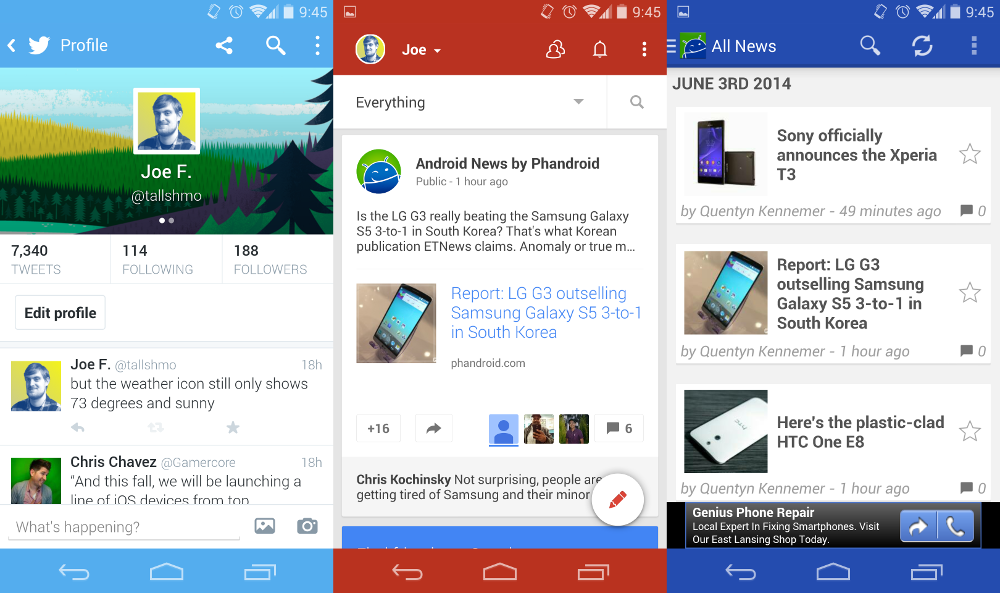
Every time I share a screenshot or make a video I get asked the same question: how did you make your phone look like that?! What they are referring to is the colored status and nav bars on my Nexus 5. This is done with a module called “Tinted Status Bar,” and it’s the original reason why I rooted my phone. This module will automatically change the status and nav bar colors to match the app you’re currently using. It’s also possible to manually change the colors for every app. You can see a few examples in the screenshots above.

Use apps in floating windows with XHaloFloatingWindows

halofloat

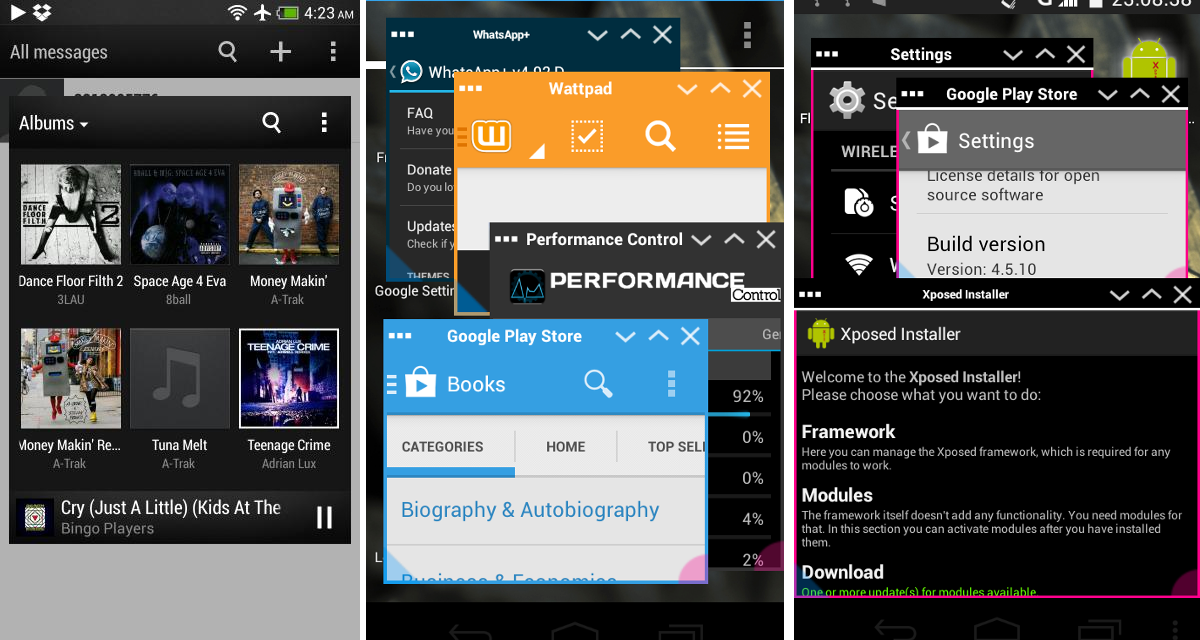
One of the most popular custom ROMs available today is Paranoid Android. It has an awesome feature called “Halo” that puts apps in floating windows. XHaloFloatingWindows is an Xposed module that brings the same feature to any ROM. This module is especially useful on Android devices with large screens, like the Note series or tablets.

Download location-restricted apps with MoDaCo Toolkit

MoDaCo Toolkit is a module that can do a bunch of things, but the most useful is the location-restriction removal. Once installed you will be able to do things like make Amazon MP3 behave like you live in the U.S., and download apps from the Play Store that aren’t available in your region. Other things you can do with the Toolkit include the ability to rotate all apps in all directions, and some special tweaks for HTC One users.

Tweak everything with GravityBox

gravity

Our last recommended module is for KitKat AOSP devices. GravityBox is full of tweaks for almost every area of your phone. Add QuickSettings tiles, lockscreen shortcuts, status bar and navigation bar tweaks, power settings, hardware key settings, and much more. It’s a catch-all for practically anything you would want to customize. This module should only be used with vanilla Android 4.4 ROMs.

Control app permissions with XPrivacy

Have you ever downloaded an app and thought “why does it need this permission?” Or have you ever wished you could just disable on specific permission? With XPrivacy you get complete control over all of your app permissions. You can sort apps by what permissions they require and spoof permissions you don’t want. For example, if you don’t want an app to know your location, XPrivacy will give it a fake one. It can also give an empty list if the app asks for your contacts. This is a very handy module for the paranoid user.


***

Xposed is one of the best reasons to root your Android device. If you love customizing your device this is an easy way to make some powerful changes. Are you using Xposed? What modules do you use? Have we convinced you to give it a try?

Leaked LG G Watch boot animation gives possible glimpse at redesigned Android logo

Posted: 03 Jun 2014 11:58 AM PDT

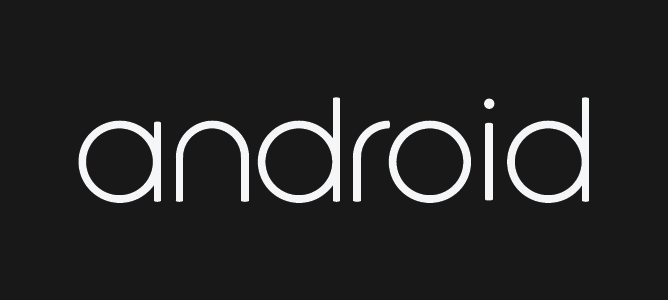
Android branding could soon be subject to a bit of a face lift if this purported LG G Watch boot animation is to be believed. The file — which was apparently pulled from a G Watch and is now flashable thanks to the handy souls at XDA — features a calming sunset that transforms into an eclipsed moon, and then eventually breaks down into a swirl of Google’s typical Blue, Green, Red and Yellow color scheme. Near the end of the animation the colors draw out the word “Android” in some rather stylish font.

new android logo

We’re not sure if Google will make this the new permanent logo, but we sure are hoping so. It’s not that we don’t have a sentimental connection to the original that can currently be found on some recent handsets, it’s just that… well, it’s ugly. It’s dated. It looks like it was designed by logo company that missed the web 2.0 ship. It’s time to retire it, and dammit I wouldn’t be mad if this is what Google would use to do just that.

new Android logo gif

[via Reddit]

Verizon bringing amber gold and glamour red HTC One M8 June 5th

Posted: 03 Jun 2014 11:00 AM PDT

HTC-One-M8- Red-Amber-Gold-1024x640

Verizon has revealed two new color options for folks who don’t like the current crop of styles for the HTC One M8. Their signature red will be sported proudly in the Glamor Red version, while those more into gold will be happy to know that they’ll have their own Amber Gold option, as well.

Beyond fresh coats of paint these are the same HTC One M8 devices we reviewed back in April, so read up on it if you’re looking to get one and want to know if it’s worth its skin. If so, you can look forward to seeing these on Big Red’s store shelves June 5th (Verizon’s offering $100 off its $199.99 two-year contract price for a limited time to celebrate Father’s Day).

[via Verizon]

Instagram 6.0 puts on its big-boy pants, introduces all new photo editing tools

Posted: 03 Jun 2014 10:54 AM PDT

Instagram banner

I’ve been a big proponent of Instagram ever since the service first launched. A social network centered around using photos to share your daily life, it was a great way to get a peek into your friends and families lives visually. There’s no question when Instagram first launched, its main draw was that it was easy for the casual smartphone user to make their photos look great using simple filters, or other light edits. But that’s where the photo editing stopped.

New photo editing tools!

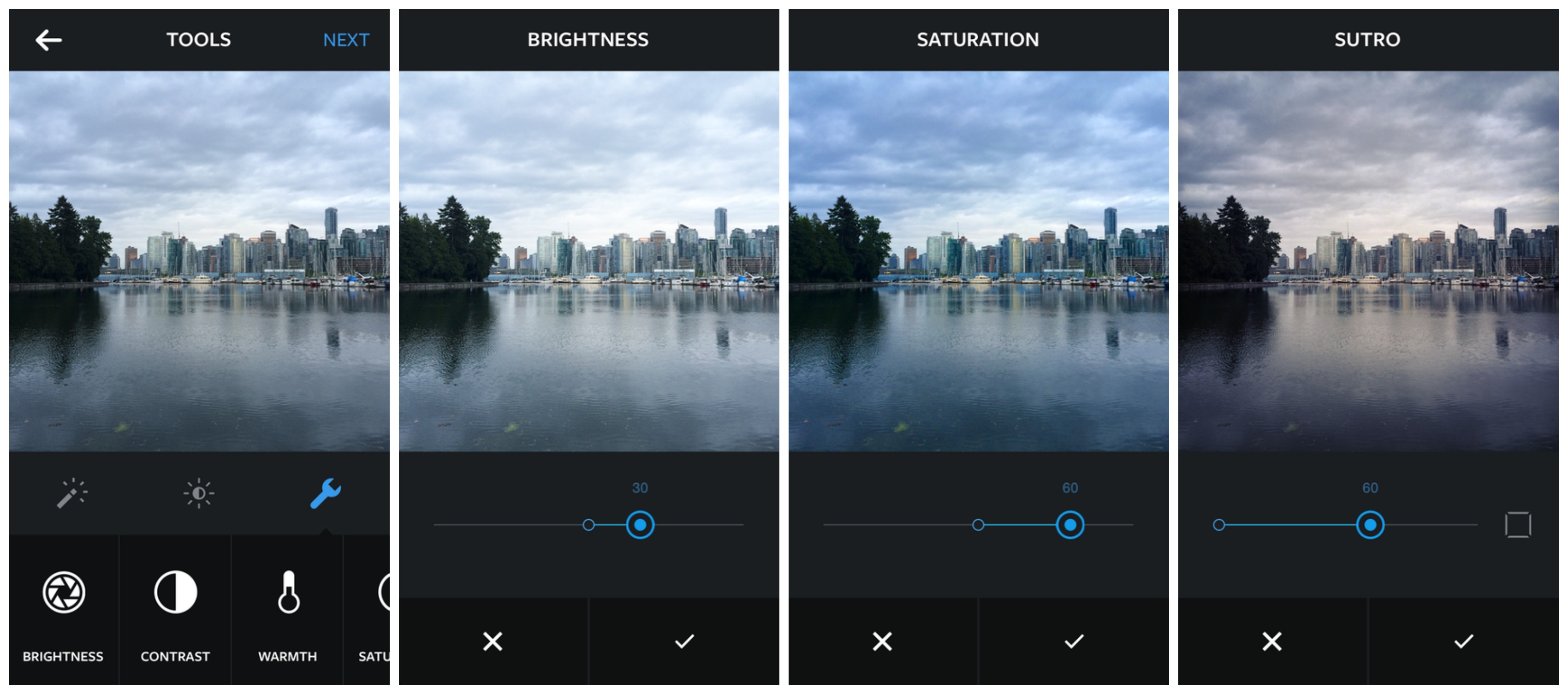
Instagram 6.0 photo editing

Today, Instagram is announcing their all new version 6.0, and it’s as big of an update as they come. Typically, photo perfectionist would go into the photo editing app of their choice (Snapseed, VSCO Came, etc.) and make edits, save those edits, then upload that photo to Instagram. No anymore. With Instagram 6.0′s new photo editing tools, users can now make basic edits to their photographs, adjusting the warmth, brightness, contrast, or saturation of their images before they apply filters. What’s more is the photo filters can now be adjusted on their own, giving users the ability to adjust the intensity for a more subdued filter.

There’s still more work to be done

These new options are much welcomed for sure. But there’s still more work to be done. Despite 1080p smartphones becoming the norm nowadays (and quad HD fast approaching), Instagram still only displays photos in a lower resolution. While this may sound perfect for iOS devices, the world has since moved on from sub-720p. I mean, this is a photo app after all. It’s 2014. Would it kill Instagram to up the resolution even a little bit for full HD devices?

Instagram test Android vs iOS

Click image for full view

Also, you may have noticed that no matter how amazing your 15 gigapixel Android camera is, photos you’ve uploaded end up looking like they’ve been snapped with a potato. Turns out the Android version of the app compresses images to a hideous, pixel-ie mess, a problem we should note is not present in the iOS version. The result? Your friends and family gloating over how much better the photos they’ve taken with their iPhone 4 look compared to your Galaxy S5.

We’re not sure entirely sure why the favoritism, but even with countless updates, Instagram has failed to do a damn thing about this issue for years now. Until they do something about this — and it’s possible Instagram 6.0 could have fixed this issue — no amount of photo editing or filters will help your Android photos look like anything more than 16-bit.

We’re anxiously awaiting Instagram 6.0 to hit the Google Play Store. You can update as soon as it goes live via the link below.

Download/update on Google Play: Instagram 6.0

WatchESPN, MLS, Crunhyroll and Google+ Photos come to Chromecast

Posted: 03 Jun 2014 09:31 AM PDT

Chromecast Featured ready to cast

Chromecast users have a few new apps to sink their teeth into starting today. This update is more for sports fans than anyone else, though folks who like to share photos on the big screen and watch anime will find nice functionality, as well.

For sports, Google is getting us ready for World Cup season as we now have access to WatchESPN and Major League Soccer (that last one being important if you need to get psyched up ahead of time). It’ll also be good for basketball fans tuning into the NBA Finals.

If you happen to want to share some of your Google+ photos with your family and friends on the big screen, you’ll now be able to do that with a simple tap of the cast button inside the photos portion of the app. Finally, anime addicts are treated to Crunchyroll’s catalog of shows (which consists of 25,000 videos and 12,000 hours of otaku goodness).

Links to all these apps can be found straight ahead, or just jump into the Google Play app on your phone and update them to get the new functionality. Happy casting!

[WatchESPN, MLS, Crunchyroll, Google+ via Google]

HTC suffers down month in May

Posted: 03 Jun 2014 08:23 AM PDT

HTC logo misc

The HTC One M8 is tasked with helping dig HTC out of the deep hole they’ve gotten themselves into, but it doesn’t seem to be doing quite as well as HTC would hope. The company posted their early unaudited results for the month of May, and they’re down not just month-over-month, but year-over-year, as well.

They saw a decrease of about 4.6% from April to May, which can be explained a couple of different ways. For starters, the HTC One M8 launched in April and the surge of sales helped HTC spike to an increase of about 36% over March. When you consider that number it was still a pretty good month for HTC, though we’re sure they would have liked to keep the increases rolling.

More alarming are the year-over-year numbers, where HTC lost about NT$7 billion (around $233 million). That is a drop of nearly 30%. HTC expects to meet their Q2 expectations despite those numbers, though they’ll need to get moving if they want to keep the revenue rolling in.

They’ve already made a few different moves to make that happen, including today’s revelation of a more affordable version of the HTC One M8. It’s clad in plastic and comes with internals that are slightly toned down, and that should result in a cheaper price tag for those who can’t quite hit the high-end budget HTC’s targeting. They’ve also committed to more consistent mid-range and entry-level devices, many of which have already been released in select markets.

HTC will also need to bounce back from a terrible marketing campaign that cost them billions of dollars and gained them little to no traction or mind share. Robert Downey Jr was cool in Iron Man, but he’s not quite good enough to sell a mobile phone, apparently. We’re obviously rooting for the company to do well because it would be a shame to see one less major competitor in the market.

[via HTC]

Sony officially announces the Xperia T3

Posted: 03 Jun 2014 05:56 AM PDT


Sony has another mid-range phone to sell you if you didn’t already jump on the billions of other phones they’ve released in the past year. It’s the Sony Xperia T3, a 5.3-inch HD smartphone housing a 1.4GHz quad-core processor, an 8 megapixel camera, 1GB of RAM, 8GB of internal storage (expandable to 32GB), NFC. Bluetooth 4.0, a 2,500 mAh battery and more.

It’ll come with Android 4.4 KitKat out of the box, delivering some of Sony’s latest software features such as Battery STAMINA, Sony Music and Video Unlimited, and camera-centric features like Timeshift Burst, Social Live and Portrait Retouch.

1_Xperia_T3_Black_Group

But even with all that, Sony’s main advertising point will be its stylish, sleek and slim looks — like they do for pretty much all their smartphones. This should come in at a pocket-friendly price point by the end of July, though no exact pricing or availability details have been given just yet. Take a look at it in the YouTube promo above.

[via Sony]

Report: LG G3 outselling Samsung Galaxy S5 3-to-1 in South Korea

Posted: 03 Jun 2014 05:22 AM PDT

LG G3 IMG_5361 edit

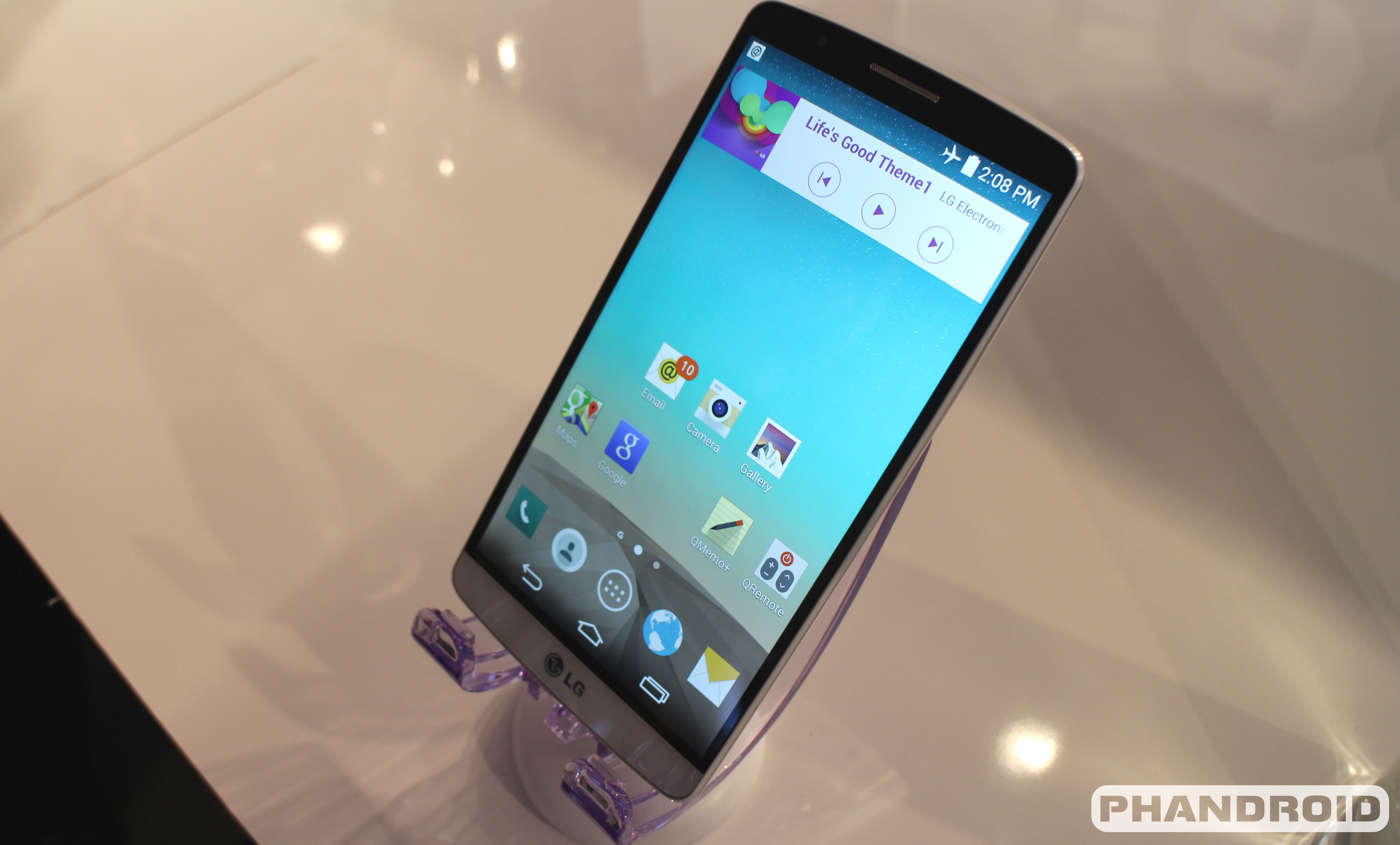
Some early sales numbers of have eeked out of Korean publication ETNews suggesting LG’s G3 is off to a very nice start. According to information they claim to have, the LG G3 is selling between 25,000 and 30,000 units per day since its launch on May 28th. The first takeaway alone was impressive — this was twice as fast as the LG G2 was selling when it first launched.

But even more staggering is the publication’s claims that the LG G3 is outselling the Samsung Galaxy S5 3-to-1 in the same launch period. The Samsung Galaxy S5 is said to have sold 7,000 to 8,000 per day in its launch. Our early thoughts have us wondering if this is simply an anomaly or something more. Has LG finally crafted a phone that people can get excited for and get behind? Or is this a one-off result in their home turf?

The former scenario certainly is plausible with LG being one of the first OEMs to mass produce a flagship smartphone with a Quad HD display inside — throw that fact into a couple of marketing bulletins and it could heavily sway public opinion. Couple that with improved build quality, cutting edge internals and new features, and we’d say that’s a fine recipe for success.

It’s needless to say that LG still has a lot of work to do if they want to catch the Samsung Galaxy S5, which has already launched in over 100 countries around the world. And there’s no telling if LG will enjoy the same success in other regions as they have at home.

One thing’s for sure, though — they’re probably feeling real nice right now, and they’ll want to make sure the momentum continues to roll as they look to launch in even more markets starting later this month. In the meantime, satiate your appetite for this treat by watching our hands-on video right here.

[via PhoneArena]

Here’s the plastic-clad HTC One E8

Posted: 03 Jun 2014 05:03 AM PDT

htc one e8

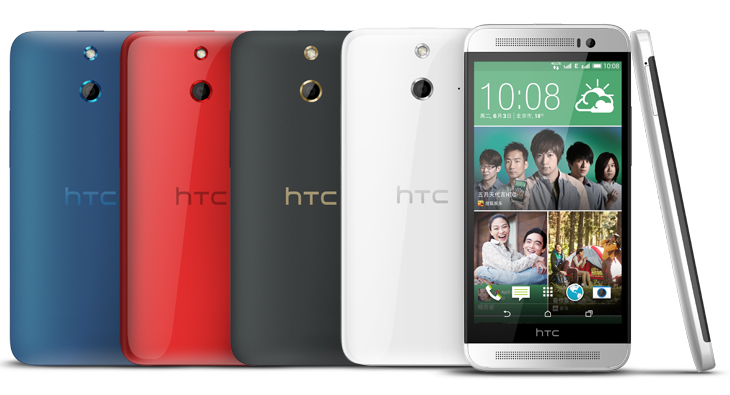
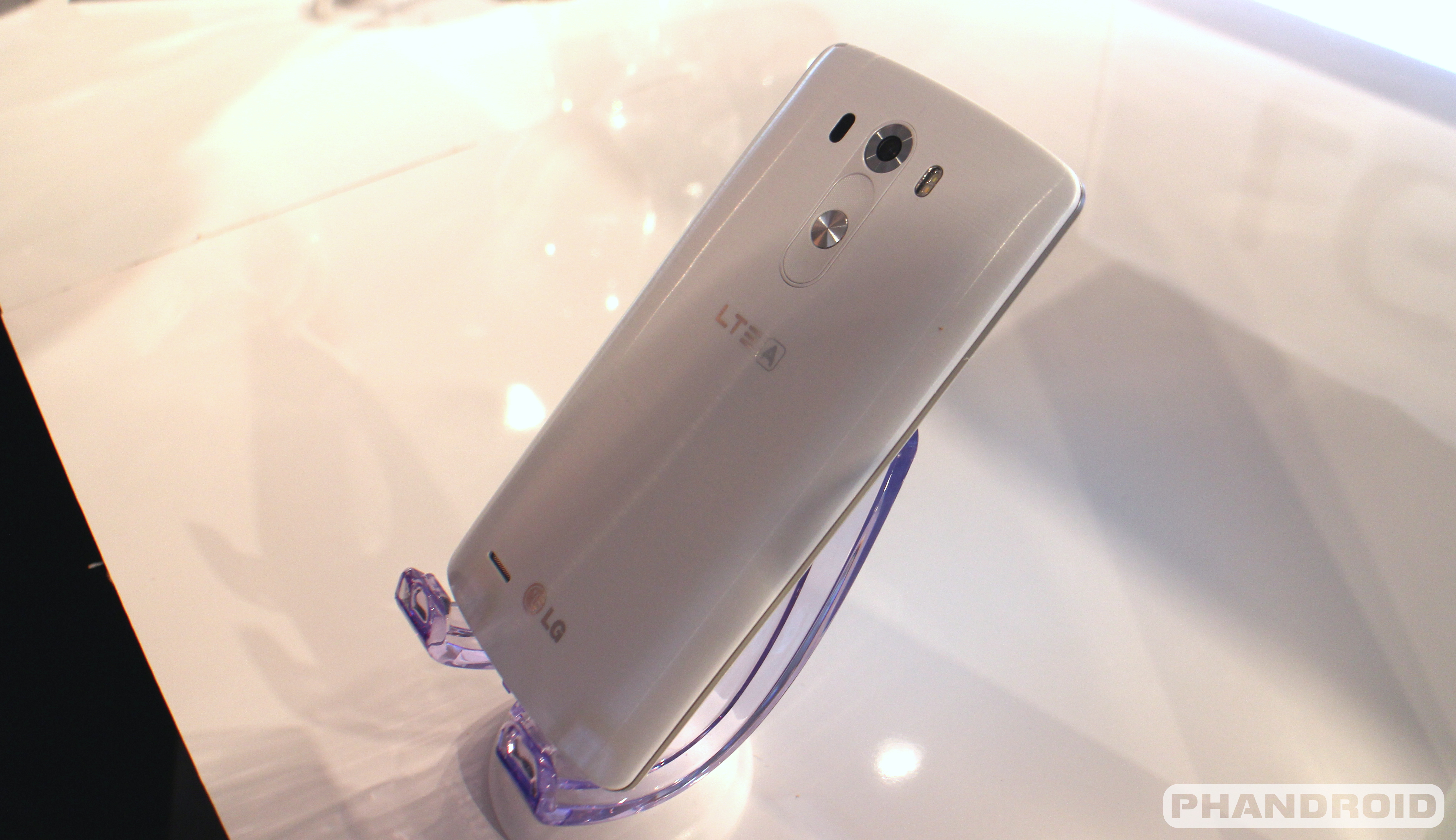
We’d heard HTC would be launching an alternate version of the HTC One M8 that housed a plastic chassis instead of the smooth metal we know and love. We thought it’d come to market as the HTC One M8 Ace, but unless this is an entirely different phone then the name has changed — this is the HTC One E8.

It’s plastic — polycarbonate plastic, to be exact — and it packs a lot of the same power that the HTC One M8 does. It has a 5-inch 1080p HD display, front-facing BoomSound speakers, a Snapdragon 801 processor, 2GB of RAM, a 2,600mAh battery and more.

What it doesn’t have in common with the HTC One M8 is an UltraPixel camera or depth sensor. Instead, you get a lone 13 megapixel sensor with a lone LED flash (which is joined by a 5 megapixel kit on the front). You’re also only getting 16GB of internal storage.

htc one e8 2

You’ll also get all the software features you’re probably familiar with in Android 4.4.2 and Sense 6 — namely, HTC Motion Launch, BlinkFeed and all of that other good stuff. HTC tells us it should be arriving in select markets in the early parts of this month, but we’ll have to wait a tad longer to get exact availability details. This could be a very nice alternative to the HTC One M8 if it comes in at the right price, so fingers crossed that there’s some real cash-saving incentive to go with this instead of just picking up the superior HTC One M8.

[via HTC]

Gizmo's Freeware: Another Program To Check For Software That Needs Updating

Gizmo's Freeware: Another Program To Check For Software That Needs Updating

Link to Gizmo's Freeware: Top selections

Another Program To Check For Software That Needs Updating

Posted: 03 Jun 2014 03:38 AM PDT

A few days ago I wrote in this column about Secunia PSI, a free utility that helps to advise you which of the programs on your PC needs updating. A couple of you suggested that SUMo (Software Update Monitor) as a program which does a similar job, so I have been taking a look at it.

Like PSI, SUMo scans your computer looking for all installed applications. It then advises which ones have an outstanding update that is available for download but which you haven't yet installed. You can then choose to download the update (manually or though the SUMo program). If you don't recognise a particular program in the list of items found on your PC, there's also an option to open the relevant directory/folder in Windows Explorer so you can take a closer look.

SUMo is free, and is a 1 MB download that's malware-free according to VirusTotal and Web of Trust.


http://www.techsupportalert.com/content/another-program-check-software-needs-updating.htm

Is That Really True or is it a Hoax? Eight Places to Find Out

Posted: 02 Jun 2014 04:55 AM PDT

Can you believe everything you read on the Internet? Of course, Gizmo's readers know that you cannot – not by a long shot. Many things you see are obviously a hoax or a scam. But sometimes it isn't all that clear whether something is true or not. Fortunately, there are some websites devoted to keeping the facts straight. So, when you want to know whether something is just a con, an unfounded rumor, or made-up story, here are some places to go.


http://www.techsupportalert.com/content/really-true-or-it-hoax-eight-places-find-out.htm

Website of the Week: How To Build The Best Gaming PC

Posted: 01 Jun 2014 03:21 AM PDT

"Logical Increments has a list of PC builds, each with a descriptive name, ranging in price from less than USD$300 to over USD$2000. There is also a list of infoboxes, describing some aspects of each component that you should watch out for when making a purchasing decision."

The website has configuration information for a variety of budgets, from destitute to monstrous. :)

The info boxes are outstanding, country configurations are available for Australia, Canada, France, Germany, Italy, Mexico, New Zealand, Portugal, Spain, Sweden, the UK, and the United States. Great descriptions for hardware - what it is and what it does. Recommendations are good general guidelines for building a non-gaming computer.

The site is a pleasure to navigate with high usability, is updated regularly, and the work in progress Peripherals page is shaping up nicely.


http://www.techsupportalert.com/content/how-build-best-gaming-pc-website-week.htm

Monday, 2 June 2014

Android Phone Fans

Android Phone Fans


LG says all-metal G3 would have cost $300 more than regular price

Posted: 02 Jun 2014 05:50 PM PDT

LG G3 IMG_5364

We still don’t have any sort of official pricing of the LG G3, but we figure it’ll hit somewhere around current flagships offered by rival OEMs. Boasting some of the most high-ended specs you can throw on a smartphone, there’s no question LG is going to have to cut some corners if they hope to keep profits high on the device.

One area some were a little confused/let down on was LG’s choice to once again go for plastic on the flagship. While metal is no doubt more premium feeling, it’s clear plastic is more economical. But exactly how much more would an all metal LG G3 run you? Well, according to LG’s Vice President of Mobile Design Chul Bae Lee — around $300 extra.

In an interview with TrustedReviews, Lee defends his company’s choice to go with a faux metal plastic, citing costs they simple couldn’t pass on to the consumer. He also mentions metal would have made the phone heavier, more slippery, and added to bulkier bezels all around.

Well, we’re not sure hot HTC managed to pull it off, but then again they haven’t been posting the most spectacular financials. Maybe there’s some logic behind plastic after all.

Contract-free Verizon Moto G now only $50 [DEALS]

Posted: 02 Jun 2014 04:59 PM PDT

Motorola Moto G Best Buy listing

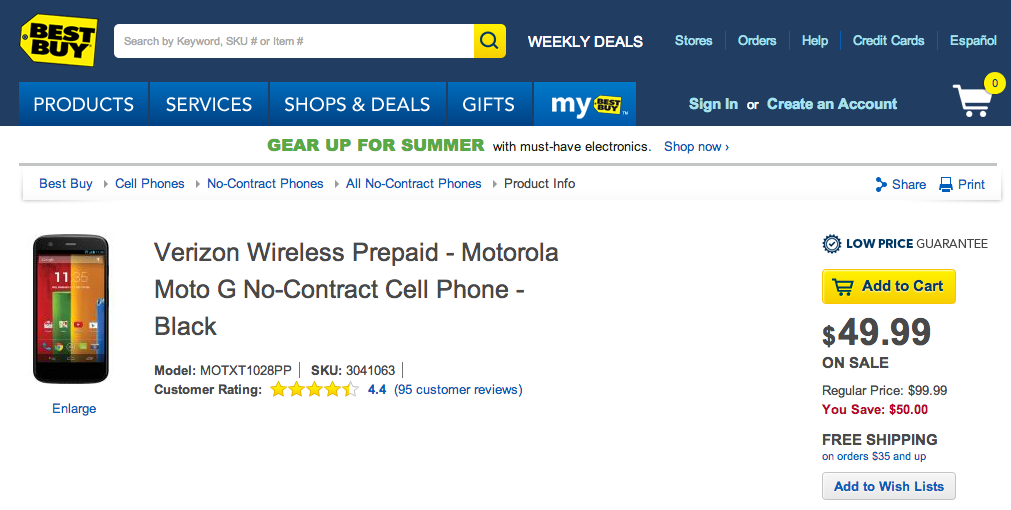
Last week we told you guys about a wicked deal on a contract-free Motorola Moto G for Verizon Wireless. Normally priced at $100, the phone saw its priced slashed to only $70 on Amazon. Now it looks like Best Buy is 1-uping that deal, offering the prepaid Verizon Moto G for only $50 straight up.

While you’ll no longer be tied down to a contract, don’t forget that this model will only connect to Verizon’s 3G — no 4G LTE here, folks. Still, even at $50, the Moto G makes an excellent WiFi-only device media player for the kiddies, or there’s even talk that the phone can be activated on a normal Verizon Wireless line (with a contract), just don’t hold us to it. Directions are as follows:

“I bought my Verizon Moto G 4/26/14 and was able to activate it on contract. You just have to bypass the activation screen (hit next, slide down notification bar, bring up task manager and swipe away the activation app) then dial *228 to activate the phone since it is 3G only. Do not try to activate through the My Verizon website, it will not work. I went from a Galaxy S3 to the Moto G.”

Link for the $50 Moto G at Best Buy provided below. Hurry, we’re not sure how long this deal will last.

[Best Buy: Moto G $50]

Android 4.4.3 factory images now available for Nexus 4, 5, 7, and 10 [DOWNLOAD]

Posted: 02 Jun 2014 03:41 PM PDT

Nexus 5 shortcuts DSC05736

After T-Mobile tipped us off that Android 4.4.3 wold be arriving today, Google has just released the new factory images for the Nexus 4 (build KTU84L), Nexus 5 (build KTU84M), Nexus 7 (2013 + 2012), and Nexus 10 on their images and binaries download page. You can either sit tigh and wait for the update to hit your device over the air, or download and apply via fastboot if you have knowledge in that sorta stuff. Have at it!

Screenshot_2014-06-02-21-45-29

[Google factory images | Drivers | AOSP]

Here’s our first solid release date for the LG G3

Posted: 02 Jun 2014 03:27 PM PDT

LG G3 hands on IMG_5374

We know many of you are anxiously awaiting the release of the LG G3. The most decked out, spec’d out phone this year, we watched as all 4 major US carriers were quick to announce the phone was indeed coming, but wouldn’t commit to a solid launch date. Well, according to The Verge, we now have a better idea of when we can expect to see the phone outside of its homeland of Korea.

The UK retailer Carphone Warehouse has confirmed that the phone is gearing up for a July 1st release, with pre-orders beginning tomorrow. And the bad news? Apparently, it looks as if wireless charging will not come standard in the Korean or US models, although it will come standard in every model outside those regions. Probably not the best news, as we saw last years, the LG G2 for Verizon Wireless was the only model to feature wireless induction charging standard.

The good news is that with a removable back, it’s entirely possible we’ll see LG release wireless charging backs for an additional sum of money, or the wireless charging Quick Circle flip case is always another viable option. For those that missed it, don’t forget to check out our hands-on video with the LG G3 below, and a quick gallery of photos in the original post here.

Top 6 ways iOS is becoming more like Android

Posted: 02 Jun 2014 02:13 PM PDT

Screen Shot 2014-06-02 at 1.54.27 PM

For many an Android fanboy, we know enough about Apple’s shortcomings with iOS not to be swayed by the prospect of a few dozen more applications and games. For many years, we’ve watched as Apple — slowly but surely — began implementing many of Androids best features into iOS, repackaging them as their own.

This year’s WWDC 2014 was no different and those of you that watched the live stream of the event know that Apple was up to their same old tricks, reinventing many features we as Android users have been enjoying for years. We ain’t even mad. They made a good effort. Now, let’s take a look at best 6 “new” features in iOS 8, and see how they compare with their Android counterparts.

Keyboard with predictive text / 3rd party keyboard support

keyboards

It’s probably the biggest pet-peeve many have had with iOS since its not so humble beginnings: lack of 3rd party keyboard support. Apple confined all its users to their keyboard, and their keyboard only. Why? Because they know best. To be fair, Apple’s keyboard is one of the better software keyboards and for iOS 8 and the inclusion of predictive text (ala Google Keyboard), makes it even better. But that’s only half the equation.

The other half is that after all these years, the new Tim Cook lead Apple is finally allowing 3rd party keyboards in the App Store. I know, it’s almost silly to watch as iOS fanboys everywhere lauded the new move, but when you’ve been in shackles for so long, it’s easy to get excited at the ray of sunshine peeking through the crack of a cell wall. While no 3rd party keyboard apps were specifically mentioned, we did see a mockup of Swype working on iOS 8 and we’re sure SwiftKey is already busy coding up something for iOS 8 as well.

Widgets

widgets

Just like we saw with 3rd party keyboards, we’re seeing another big with the slightly more “open” iOS this year. Addressing complaints since the dawn of iOS, Apple is finally introducing — wait for it — widgets in iOS 8… Well, sort of.

No, you can’t place them on the homescreen. Instead, developers can take advantage of new APIs that they can use to place widgets inside of Notification Center. They’re pretty functional too, showing information like sports scores or eBay auctions. But don’t expect to see the same robust widgets that we’ve enjoyed on Android all these years. As so often is the case, iOS’ implementation is much more simple.

Actionable notifications

iOS 8 interactive notifications

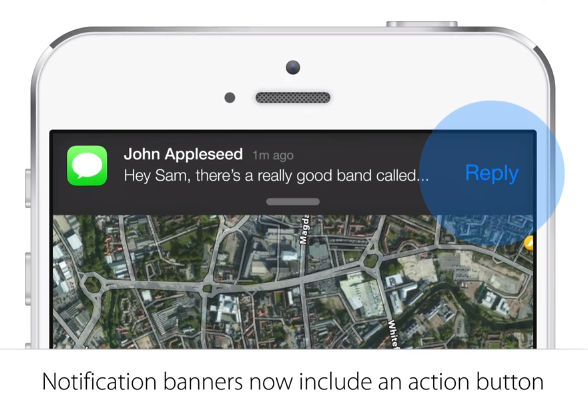
Android’s notifications panel saw a major redesign back during Ice Cream Sandwich and it only got better in Jelly Bean. Apple, still being somewhat new to the concept of notifications (Notification Center debuted back in iOS 5), is now finally introducing new actionable notifications for iOS 8.

Soon, users will be able to interact with their notifications while inside another app, without having to jump inside another app to respond or address a notification. Sliding down a notification banner will display actionable items, giving users the ability to reply to SMS messages, address calendar events, or like a comment on Facebook. Once again, it’s not the same robustness we’ve seen on Android, but something is better than nothing.

Messages

messaging

For iOS 8, Apple is introducing a handful of new features that brings Messages closer to Hangouts than ever. First up, iOS users will soon be able to send their location to other friends and/or family, handy when you don’t feel like searching for or typing up an address. Also new is the ability to send short video or voice messages. Once again, useful when you’re hands aren’t free to type something out.

If you’ve been using Hangouts on iOS, you’d know that a few months ago they added the ability to send video messages (although it’s not available in the Android version yet). So we’ll hand it to Apple, they done did good. What’s more is messages can be set to self-destruct a la Snapchat and they also added new options for group messaging so users can finally leave group chats, or rename them.

Apple is also making it extremely easy to receive calls and messages from your phone on your OSX computer. Of course, you can do this right now using Hangouts and it works whether you’re using OSX or Windows. However, we will admit, Apple’s implementation is nice in that it works right out of the box with little-to-no setup.

Extensions (sharing)

sharing

The crowd went nuts when Apple announced the extensions for iOS 8. Essentially a way for apps to communicate with one another, it’s just another feature we’ve long enjoyed on Android for countless releases. Of course, Apple is using it a bit differently in that developers will first need to enable this feature in their apps. Once (if) they do, it will be possible to open up a picture in the Photos app, and share it to a photo editing app. We know, your minds are blown. The benefit Android has is that sharing is built into the core OS. In other words, “It just works.”

Always-listening Siri

hey siri

It’s a killer feature found on the Motorola Moto X (and technically possible on any Snapdragon 800 device): the ability to send voice commands to your phone without ever touching it. Apple is adding this breakthrough new feature in Siri for iOS 8, allowing users to speak the command, “Hey Siri,” (much like “Okay Google Now”) and further direct the phone to perform searches, or queue up Shazam to identify a song.

*****

Before we leave, we just want to say we’re not trying to start a flame war. Although it can be fun to play devil’s advocate, we get it. At the end of the day, both mobile Android and iOS are great and serve their specific purpose. While we agree that it can be irritating to watch another company bite/copy/steal some of Android’s best ideas, it’s just the evolution of modern software and something that comes with the turf. Borrow one idea, improve it, and so forth.

We’ve felt for awhile now that mobile OS’ will soon match each other in terms of features, and at the end of the day, which platform you align yourself with is your prerogative. Still, when it comes to openness, customizations, and options — we still choose Android.

Google Now is killing Android apps

Posted: 02 Jun 2014 01:56 PM PDT

nowkiller

As some of you may know, last week I went away on my honeymoon. I am not someone who does a lot of traveling, so whenever I go on a big trip I download a bunch of travel apps that I think I will need. TripIt, Yelp, Foursquare, and Delta Airlines are a few of the apps I tried. Something very interesting happened while using all of these apps, and it’s something I’ve noticed in the past.

Google Now was providing much of the same information that all of these apps could, and it was doing it equally as well or even better. By the end of the trip I uninstalled most of the travel apps and just relied on Google Now. Other Google apps have had the same effect on me in the past. On the surface this may sound great, but could it be the beginning of the end for Android?

The Good

As I mentioned above, Google Now is great for consumers. At the airport it was invaluable for quickly locating gate numbers and flight times. Google Now updated with new information faster than Delta’s own app when one of my flights got delayed. It would also get the gate number for connected flights faster than any other app I used. Having all of this information just a swipe away was incredibly handy.

nowapps

Google Now can do much more than just travel. It was also telling me the weather at my destinations without me ever having to ask, and remembering where we parked our car. Of course, as you know, Google Now also provides suggestions for nearby places and events. The list of applications that were created to do these sorts of things is gigantic. Now it can all be done with one app from Google. So where is the problem?

Remember how popular Dolphin Browser was back in the day? Now that Google Chrome has come along you hardly hear about it. Other Google apps like Keep, Hangouts, Play Music, Play Games, Device Manager, and Drive have stepped on the toes of popular 3rd-party offerings.

The Bad

One app being able to do the job of many other apps is great for consumers, but not for developers. Suddenly the app that you spent time and money on has been replaced by an app that comes pre-installed on most phones. Some phones can even access Google Now right from the launcher with a swipe to the left. This is an unfair advantage over other Android apps. It’s no surprise that Google Now and other official Google apps have had an impact on developers.

One example of this happening is in our Phan Favs polls. In one poll we asked you to tell us which apps you use to check the weather. There are hundreds of great weather apps available in the Google Play Store. Many of them have powerful tools, but the super simple Google Now came in 4th place. It doesn’t have all the bells and whistles, but it’s always there and you don’t need to install an app to do it. When we asked about messaging apps you picked Hangouts by a landslide, and in our music poll you selected Play Music by a mile.

So what?

Google-Apps

Developers get turned off when consumers stop downloading apps because the core OS can do most of the things they need. One recent example of this is Microsoft’s Windows Phone. In the beginning Microsoft built it to do almost everything you would want without the help of apps. You could even use Facebook and Twitter without installing an app. I don’t need to tell you about the app problem Windows Phone has now.

iOS was the opposite. If you don’t install any apps on your iPhone there isn’t a ton that you can do. Hence the need for apps and the massive App Store that followed. Right now Android is closer to iOS on the spectrum, but it is quickly filling up with more Google apps. As we’ve found out in our Phan Favs polls, Android users are flocking to Google’s own app offerings. This is good for Google, but it could be bad for the future of Android. Developers are the life blood of any successful ecosystem.

What about you? Do you find yourself using less and less 3rd-party apps in favor of Google’s apps? Has Google Now replaced other apps on your phone? Do you think these things are bad for Android? Let us know!

Shots Fired: Apple takes aim at Android at WWDC 2014 iOS 8 reveal

Posted: 02 Jun 2014 11:51 AM PDT

Screen Shot 2014-06-02 at 1.51.10 PM

An Apple event wouldn’t be an Apple event without them trying to take shots at the competition. After going over the (awesome-looking) new changes to Mac OS X Yosemite, Apple decided to talk about iOS 8 and all the new changes they’re planning to bring. But before they dove into the meaty bits, they took a quick few minutes to talk about none other than Android.

Tim Cook had no problem ridiculing Android from several different angles. For starters, he says most of the folks who first bought an Android phone and then bought an iPhone afterward basically admitted to making a big mistake. He used that infamous 97% customer satisfaction value to back that point up, natch.

Screen Shot 2014-06-02 at 1.52.37 PM

Timmy also went on to cite the other typical numbers folks use to bash Android. He reminded us that only 9% of Android’s install base is on the latest version compared to 89% for iOS. And of those running Android, over a third of them are still running a version from over four years ago.

He cheated a bit there: the only way he could have come to that conclusion is if he lumped Ice Cream Sandwich and Gingerbread together, with the former being just about three years old. That’s what the numbers found over at the Android Platform Distributions site tell us, anyway.

And let’s not forget to mention the fact that Gingerbread is only 3.5 years old — not a far cry from 4, but his statement is certainly not factual. Regardless, the point stands and stings: a ton of people are still on what can be seen as archaic versions of Android.

He bent the truth a little by claiming that those on older versions of Android don’t get new features. We all know that’s not quite true considering Google has a habit of delivering new features using apps and updates to Google Play Services, some of which are compatible with all versions of Android dating back to Froyo. Also, last we checked not all iPhones and iPads got all the latest features in those iOS upgrades (we’re looking at you, Siri).

Screen Shot 2014-06-02 at 1.52.50 PM

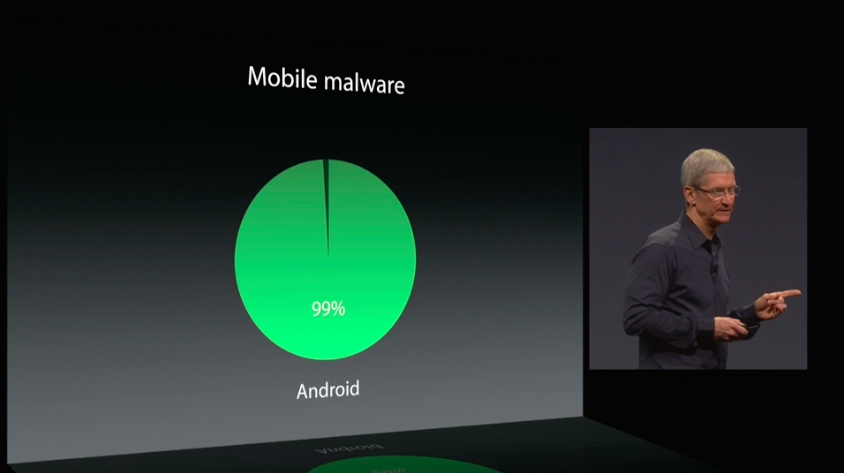
Finally, Cook didn’t disappoint by pulling out the “hot” new buzzword that everyone uses to bash Android — mobile malware, and how Android is subject to 99% of it (though how much of it actually affects end users is an entirely different matter all together).

We’re not surprised that Apple is looking to bash Android into the ground at every opportunity they can get. That’s marketing and business, and it isn’t quite as taboo as when the company was still being run by the late Steve Jobs.

But there’s something to be said about plucking obscure numbers out of the air in selective fashion while dodging the ones that truly matter — Android’s 79% of the global smartphone market share as of January 2014.

Sure, Android’s popularity may be more about accessibility (namely, its ability to meet the price point of any budget) than anything else, but at the end of the day it really doesn’t matter how Android ascended to the throne: it only matters that it got there.

Screen Shot 2014-06-02 at 2.33.53 PM

Truth be told, iOS 8 looks quite nice. Apple’s finally crafted an upgrade that feels more evolutionary than iterative, and it’s the first time in a long time that it doesn’t feel like they’re playing catch-up to Android. But it’s going to take a lot more than new features, petty shots at the competition and skewed information to recapture the huge sector of the market they lost while they were lollygagging for the past few years.

The ball is in Google’s court now, and a Google event wouldn’t be a Google event without a few jabs of their own. Let’s keep our fingers crossed that Google will fire back at I/O later this month by introducing lots of exciting new features because it finally seems like Apple is bringing some real heat. Be sure to keep tabs on all the latest from Apple’s WWDC 2014 by heading to our friends at iSource.

T-Mobile Nexus devices getting Android 4.4.3 today

Posted: 02 Jun 2014 09:49 AM PDT

android-kitkat

T-Mobile has announced that several of their Nexus devices — including the Nexus 4, Nexus 5, and 2013 Nexus 7 — should be getting Android 4.4.3 starting today. As expected, the update isn’t big and doesn’t bring much in the way of new or exciting features. It’s mostly a bug fixer that should do a decent amount of house cleaning.

T-Mobile’s release notes don’t go into too much detail about said changes, though, so we’ll have to wait for some coders to get their palms greased and dive in head first. Those with the Nexus Nexus 4 and Nexus 7 should be looking for version KTU84L, while the Nexus 5 should be getting KTU84M.

The updates are identical in size at around 54MB each, and you should be able to come up from almost any prior version (as long as you haven’t rooted or installed custom ROMs, obviously). The staggered OTA process is expected to run between June 2nd and June 9th, after which you’ll be able to apply it manually if you so please. Head to the Settings > About Phone menu to check for updates, but not before making sure you’re on WiFi and charging your battery up to at least 50%.

[via T-Mobile 1 | 2 | 3]

Pushbullet beta comes to Google Play for fearless explorers

Posted: 02 Jun 2014 08:31 AM PDT

Pushbullet

Pushbullet already pushes out (no pun intended) features at an alarming pace, but if you need to be at the very edge of development you can now participate in their beta program via Google Play. It’s as easy as joining a beta program has ever been — join the community here, then opt into the beta here. Simple, no?

From there you’ll be delivered updates of all the latest features before they’re ready for gen-pop. They also announced an update to their Windows app that adds support for notification mirroring so be sure to check that out if you’re into that sort of thing.

[via Pushbullet]

Samsung’s first Tizen phone is finally here — beginning of the end for Galaxy?

Posted: 02 Jun 2014 08:09 AM PDT

samsung-z1

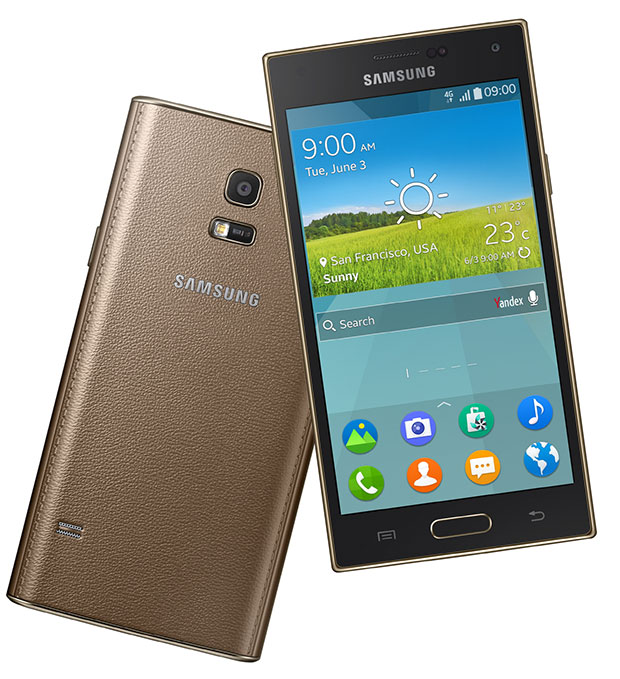
Samsung’s finally done it, folks — they’ve brought their first Tizen-based smartphone. It’s the Samsung Z. No Galaxy in the name, naturally, because it doesn’t run Android. It’s very much a Samsung phone, though. It features TouchWiz with S Health 3.0, a fingerprint scanner, and a heart rate monitor. It has a 2.3Ghz quad-core processor 2GB of RAM. And it even has that familiar faux leather back that some of Samsung’s latest products have been sporting. Unfortunately the display doesn’t quite match up at 4.8 inches and 720p resolution, but that’s good enough for any decent smartphone.

samsung z 4 samsung z samsung z 2 samsung z 3

So what now? Is Samsung going to make a full-fledged attempt to replace their Android-based Galaxy lineup with Tizen-based offerings like they did with smart watches? By extension, is the Samsung Galaxy line doomed? And by further extension, is Android doomed?

Not likely. Samsung still has a long way to go if they want to ween off the alc– I mean, Android. Tizen doesn’t currently have much developer support, and even if Samsung begins courting a good deal of developers it wouldn’t be able to match up to the prowess of Google Play. And we all know users go where the apps are (which is probably why Microsoft is having a tough time finding solid footing in the smartphone space).

The short answer is that this shouldn’t be worrying anyone. We’re sure Samsung would love to someday blossom into Apple and produce all their own software and hardware, but that day likely isn’t around the corner or even up the street. They have to start somewhere, though, and this is where they’ll begin.

[via Samsung Tomorrow]

HP finally reveals new SlateBook 14 and 11-inch Chromebook

Posted: 02 Jun 2014 06:47 AM PDT

HP has revealed two new notebooks that Android-loving folks might want to consider. First is a refresh of their 11-inch Chromebook laptop, which features improved battery life at 6.5 hours and a host of new colors to choose from, including Ocean Turquoise. You still get built-in 4G connectivity and 100GB of Google Drive space, and everything else that comes with your typical Chromebook experience. HP says to look forward to it in July for just $280.

hp slatebook 14

More interesting is the new Android-based SlateBook 14, which HP accidentally leaked back in April. For $430, you’re getting a 14-inch device with a 1080p touchscreen, NVIDIA’s Tegra 4 chipset, between 16GB and 64GB of internal storage, 2GB of RAM, 2 USB 2.0 ports, 1 USB 3.0 port, 1 HDMI 1.4b port, and an HD webcam. You’ll also get about 9 hours of battery life. Not too bad if you don’t need a powerhouse PC to do simple, everyday tasks. It’ll be available for purchase starting July 20th. Let us know if you’ll be looking to pick either of these up in the weeks to come.

[via HP 1, 2]

Dell brings us a pair of new Android-based Venue tablets at Computex 2014

Posted: 02 Jun 2014 06:08 AM PDT

dell venue 7 3

Dell is taking another stab at the tablet market with a new pair of Android tablets. Announced at Computex 2014 in Taipei, the Dell Venue 7 and Dell Venue 8 take center stage for the company’s round of tablet announcements. The numbers in their model numbers refer to their size, of course, and while both tablets are largely the same there are a few key differences to note.

The biggest difference will be in the resolutions — the 7-inch model sports 1280 x 800, while the 8-inch model bumps it up to 1920 x 1200. The processors also differ slightly, with the 7-inch getting Intel’s 1.6GHz Atom Z3460 and the 8-inch getting the edgier 2.13GHz Z3480. Both are derived from the Merrifield line, and feature dual-core architecture, 64-bit instruction sets and 1MB of on-board cache. Finally, these two employ different front-facing camera sensors — a 1-megapixel shooter for the 7-inch model and a 2 megapixel shooter for the 8-inch.

dell venue 7 1 dell venue 8 3 dell venue 8 2 dell venue 8 1

That’s where the differences end, though, as nearly everything else is the same. Those specs include 1GB of RAM, a 5 megapixel rear camera, and run Android 4.4 KitKat.

Dell gave us a quick look at the accessories you can expect to be able to buy, including a wireless charging cradle, a rotating folio case, a keyboard folio case and portable Bluetooth speakers.


Both tablets are expected to arrive July 1st in WiFi-only flavor with price tags of $159 and $199 for the 7-inch model and 8-inch model, respectively. Dell says LTE versions are on the way as well, though we’ll have to wait for further word on pricing and availability for those.

[via Dell]

ASUS announces range of new Android tablets, including a “5-in-1″ Android/Windows hybrid

Posted: 02 Jun 2014 05:35 AM PDT

As we expected, ASUS had a lot to show at Computex Taipei this week. New Fonepads, new MeMoPads and new Transformer books are aplenty here, so let’s not wast any time jumping into what’s new.

MeMO Pad 7 and 8

For starters, we’re getting two new MeMo Pad models — one in a 7-inch outfit, and one that’s just an inch larger. The 7-inch MeMO Pad is billed as a 64-bit Android device thanks to Intel’s quad-core Atom Z3745 chipset (clocked up to 1.86GHz). It’ll feature a 5 megapixel rear camera and a 2 megapixel front camera, and also has “high definition” resolution — 1280 x 800, to be exact.

ASUS introduced the next generation MeMO Pad 7 and MeMO Pad 8 at

MeMO Pad 8 steps things up just a tad with its Intel Atom Z3580 quad-core chipset clocked up to 2.3GHz. ASUS calls it the world’s lightest 8-inch Android tablet at just 299 grams, and it also doesn’t have much girth at 7.45mm thin. This particular tablet is said to have “full HD” resolution, so we can expect 1080p at the very least. It also houses 802.11ac WiFi and an LTE modem inside for those who prefer to get their data from a cellular network.

Fonepad 8

Next up to bat is the Fonepad 8, which is basically a huge phone. It’s an 8-inch kit with 1280 x 800 resolution, and has Intel’s 64-bit Atom Z3560 quad-core processor at 1.8GHz. It also features dual front-facing speakers for those who value booming sound.

For software, Android-based ZenUI is on-board with a new flat design and over “1,000″ software improvements. Whether all those improvements are tangible remain to be seen, though ASUS says features like “What’s Next” and “Do It Later” are among the many other enhancements that will help you in your day-to-day life.

Transformer Book V

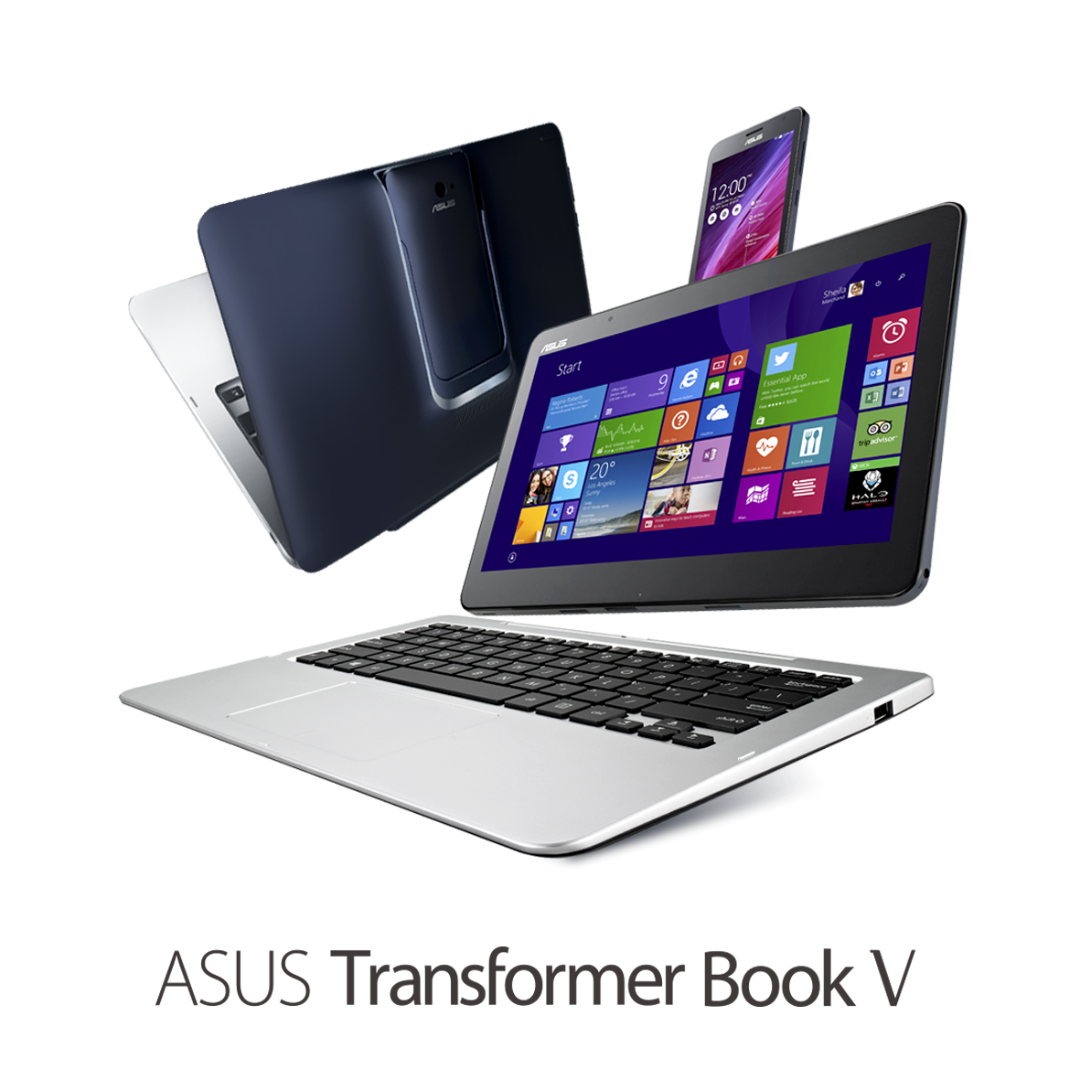
Moving up the food chain, we run into perhaps the most interesting device yet — the Transformer Book V. ASUS is calling this the first 5-in-1 device thanks to its ability to run both Windows 8.1 and Android either in tablet or laptop mode, as well as an Android phone that can be docked inside the tablet.

ASUS Transformer Book V_PR01

As a laptop, it features a 12.5-inch HD display, a “next-generation Intel chipset,” and can run both Windows 8.1 and Android (you can swap between the two modes at the easy touch of one button). It’ll also house 1TB of storage when docked.

Take it off the dock and you can still run Windows 8.1 and have access to up to 128GB of internal storage, though you’ll need to dock the 5-inch Android phone inside the tablet in order to switch to Android. As far as that phone goes, it houses a quad-core Intel processor itself, as well as LTE and a 2,500mAh battery.

ASUS Transformer Book V_PR02

ASUS had other goodies to show off, such as new high definition monitors, all-in-one Windows devices and Windows notebooks. You can read more about those at the press released linked below. No word on when and where we can expect to see any of these devices, but that doesn’t keep us from being excited about their arrivals. Let us know how you feel about all of these in the comments below!

[via ASUS]

Sunday, 1 June 2014

Android Phone Fans

Android Phone Fans


HTC’s Android Wear smartwatch dubbed ‘One Wear’ said to launch in August or September [Rumor]

Posted: 01 Jun 2014 05:57 PM PDT

htc-logo-600x399

Back in October 2013, HTC's Peter Chou mentioned the company's view on wearables, indicating that the wearable market was important and that HTC wanted to enter the space when the timing was right. Then, just a few months ago in February, HTC's Cher Wang spoke on the company’s stance on wearables again, stating that HTC would be getting into the wearable market before the end of the year.

According to a new report from TK Tech News, HTC plans on joining the smartwatch game with Android Wear coming in August or September of this year. Tentatively called HTC One Wear, sources close to the matter have reported that HTC’s smartwatch is set to rival the Moto 360 with a round design and be available in both polycarbonate and metal flavors.

If HTC’s track record of design and build quality with their One line of smartphones has taught us anything, the One Wear smartwatch should complete their goal of rivaling the Moto 360 on the design front.

Anyone interested in an HTC One Wear?

Source: TK Tech News