This weeks wallpaper is made up of concentric circles and patterns reminiscent of old maps. Reds, golds and blues are the predominant colors in this intricate and colorful wallpaper. If you enjoy high contrast backgrounds you may want to skip this one.
One of the most exciting announcements at Google I/O was Chrome OS devices being able to run Android apps. During the demo they showed Evernote, Flipboard, and Vine running on a Chromebook. It’s not exactly clear how Google is doing this. We don’t know if the app is actually installed on the device, if it’s being mirrored, or if there is something else going on. One thing we do know is it was awesome.
We’re sure many of you saw the demo and immediately started fantasizing about using your favorite Android apps on a Chromebook. Unfortunately, Google says they won’t be able to support every Android app from day one.” Only a few handpicked apps will be available at first. For the rest Google is asking for users to chime in with their favorite apps. You can hit the link below to fill out the super simple survey. All you need to do is paste the Google Play URL of the app you want to suggest.
Verizon’s XLTE (LTE-Advanced) network upgrades are moving faster than ever since the initial launch with the wireless carrier announcing that more than 50 new markets have been added to the list today. That brings the full roster to more than 300 cities with XLTE (you can find the full list here).
XLTE delivers up to double the bandwidth of Verizon’s previous deployment, giving you a faster data connection and less congestion in crowded areas. Verizon already has a pretty sizable list of devices that are capable of receiving XLTE speeds, including recent heavy hitters such as the Samsung Galaxy S5, HTC One M8 and the Samsung Galaxy Note 3. Even older devices such as the DROID line, the LG G2 and many other flagships from last year can enjoy the increased speeds.
Verizon proved with their initial 4G LTE rollout that they had the innate ability to reach a wide range of people in an extremely short amount of time, and they’re proving they can do it all over again with these latest upgrades coming in at breakneck pace. Let your eyes wander below for the full list of the newest cities added to the mix in case you’re curious. Fire your XLTE-capable device up and give it a try if you happen to be in an area drenched in the new coverage.
If you use the Amazon Appstore you are probably familiar with their “Free App of the Day” program. As the name implies, every day they make one paid app available for free. It’s a pretty neat promotion if you actually use the Amazon Appstore. If you don’t use the Amazon Appstore we may have a good reason for you to start.
Amazon is putting 31 of its most popular paid Android apps up for free. All of the apps combined are worth over $100. The list features a great mix of apps for planning, travel, weather, productivity and games. Amazon is running this promotion today and tomorrow (June 27-28). If you’re interested in these apps you can get the Amazon Appstore by following these steps. Check out the full list of 31 apps and games below. Enjoy!
“Android is everywhere.” Everyone always says that, but this year at I/O it was demonstrated on stage. They showed it on watches, TVs, cars, phones, tablets, and even PCs. We talk about all of this, plus Android’s new design, and why protesters hate Google. It’s Google I/O discussion from start to finish this week. Thanks for watching/listening!
Samsung is kicking off a pilot program to allow potential customers to try out their new phones and smartwatches (Samsung specifically mentioned the Galaxy S5, Note 3, Gear 2 and Gear Fit) for a bit of time. It’ll be great for those who are wondering if the grass really is greener on the other side and wouldn’t mind giving it a real no obligation try for themselves. You’ll get 21 days — a full three weeks — to see if the device you are interested in is worth the money.
There is one caveat: you’ll have to agree to a refundable deposit on your debit or credit card. Unfortunately Samsung doesn’t specify how much this deposit is, though it shouldn’t be so much that it’ll tie up all your finances. The deposit is fully refunded at the end of the trial period if you decide not to go through with the purchase. Otherwise, you can opt to be charged the full amount and keep the phone for yourself.
Wondering where you’ll be able to take part? Samsung is running the trial at the following 5 Galaxy Studio retail locations:
Houston/The Woodlands, TX: The Woodlands Mall, 1201 Lake Woodlands Dr, The Woodlands, TX 77380
Los Angeles/Canoga Park, CA: Westfield Topanga, 6600 Topanga Canyon Blvd, Canoga Park, CA 91303
New York City: Samsung Galaxy Studio SoHo, 130 Prince Street, NY, NY
Santa Clara, CA: Westfield Valley Fair, 2855 Stevens Creek Blvd, Santa Clara, CA 95050
That’s not a healthy helping of locations, but if you’re in any of those areas and wouldn’t mind carrying around one of the latest Galaxy devices for a few weeks you’ll know where to go.
In case you haven’t taken care of your memory needs during Amazon’s billion other Gold Box sales here’s another opportunity. Sony’s silicon is being offered up cheap today, with SD cards, microSD cards, and USB drives going for as much as 70% off. Here’s a full list of what’s on tap:
Whew, that’s a lot. There should be enough here for any of your needs, whether that’s a microSD card for your phone, a full-sized SD card for your tablet or Chromebook, or even double-sided USB drives for transferring data between multiple smartphones, computers and tablets. The deal won’t be lasting past the end of the day so get in on it before it’s too late!
The latest trend in official Google apps is Android Wear support. Today two popular apps are adding support for Google’s wearable platform: Maps and Keep. Both of these apps can already interact with Wear devices, like all apps can out of the box, but these updates will add deeper integration.
The latest version of Google Maps adds Android Wear support and some bug fixes. It’s available right now in the Play Store for everyone. The Google Keep update is a bump from version 2.2 to 2.3, which only adds Android Wear support. It has been slowly rolling out to users with Google Play Services 5 (which can be downloaded from here).
The Keep update is the bigger of the two. Google demonstrated how an Android Wear device can interact with Keep on stage during their keynote. You can easily use your voice to create lists, notes, and other things in Keep right from your wrist. Keep has always been a handy app, but this addition makes it killer for Android Wear users. Check for both of these updates in the Play Store now.
XDA member ivan123 decided to dig into his full system dump and pull out all of the juicy bits, including apps, wallpapers, and even the new Android boot animation. Some of these goods can only be installed using flashable .zip files, some are standard APKs, and some aren’t meant to be flashed at all. Here’s a full list of each:
Apps, APKs and flashables
61 APKs of various system apps, including Chrome, Calculator, Calendar, Drive and more. Note that many of these .APK files aren’t meant to be user-facing, and some of them may be no different than what is already installed on your device. Proceed with caution.
And if you need everything that came from the images being flashed, here’s a big system dump file for you to traverse. Note that this file is not meant to be flashable in any way, so don’t try and do anything funky with it (unless, of course, you know exactly what you’re doing).
As always, you take full responsibility for anything that may happen to your device as of the result of any non-OEM approved modifications. It’s important that you proceed with caution knowing that you are taking a risk and that you are taking that risk alone. As long as you understand that, though, then you’re free to go wild. Have at it!
One of the big areas of focus for Android 4.4 KitKat was to be compatible with low-end devices. With Android L, Google is continuing to make sure low powered devices run smooth and fast. We are already hearing about certain low-end (and high-end) devices being updated to Android L.
Motorola Germany has confirmed on Facebook that both the Moto X and Moto G will be receiving Android L this Fall. They referred to the update as Android 5.0, which we assume will be the version number of Android L. Motorola also responded to a comment about the Moto E, saying they are not sure yet if it will be upgraded as well.
Motorola has been exceptional at getting their devices on the latest version of Android. We expect no different when it comes to Android L. If you are the owner of a Motorola device you have to be a happy camper right now. Summer is great, but we have a feeling many of you are looking forward to Fall.
UPDATE: Apparently the “Motorola Germany” Facebook page is not legit. The real Motorola had this to say:
Unfortunately, we have found that a Facebook profile under the name “Motorola Germany” with the following URL facebook.com/MotoDACH/ was created. We would like to point out that this is not an official Motorola site and expressly distance ourselves from said content. All relevant information about Motorola can be found only here on this page.
You are subscribed to email updates from Phandroid To stop receiving these emails, you may unsubscribe now.
Last week I recommended that you take a look at Cryptainer if you need a replacement for the now-defunct TrueCrypt encryption product. A handful of people have suggested that another free program, AxCrypt, is also a suitable replacement, and I promised to take a look at it. So here goes.
AxCrypt is free, and and is a 3.3 MB download. and should install on all recent versions of Windows.
Unlike TrueCrypt, which creates virtual encrypted drives, AxCrypt works on individual files. If you want to encrypt multiple files, you'll need to do them one at a time, or add them to a zip file and then encrypt the zip. Which, if you've got lots of files but only a handful of them are confidential, actually works very well. Just right-click a confidential file, choose the Encrypt option, and you're done. To open the file with whatever app it's associated with, double-click it as normal, and enter the password when prompted.
However, while AxCrypt provides useful features, it fails one of the key tests here at Gizmo's. here's why:
The ever growing smartwatch market is about to get a little more crowded this year. We’ve already seen smartwatches introduced by LG, Motorola, and Samsung. Where just about every OEM is planning on releasing their take on the new Android Wear revolution, despite varying form factors, they’re all priced very close to one another (give or take a few bucks). That’s where ASUS steps in.
A new report from TechCrunch suggests the manufacturer is gearing up to release an Android Wear smartwatch of their own. Its killer feature? Its price tag, looking to launch at somewhere between $100 and $150. This could very well be the most affordable Android Wear powered smartwatch arriving this year. According to the report, this ASUS smartwatch will feature an AMOLED display with @evleaks providing additional information about the smartwatch’s form factor, mentioning the wearable (codenamed Robin) is looking to be the thinnest in its category.
It appears the ASUS Robin could be looking at a September release date, pitting it against the upcoming Motorola 360, as well as the soon to be released LG G Watch and Samsung Gear Live. HTC — where you at?
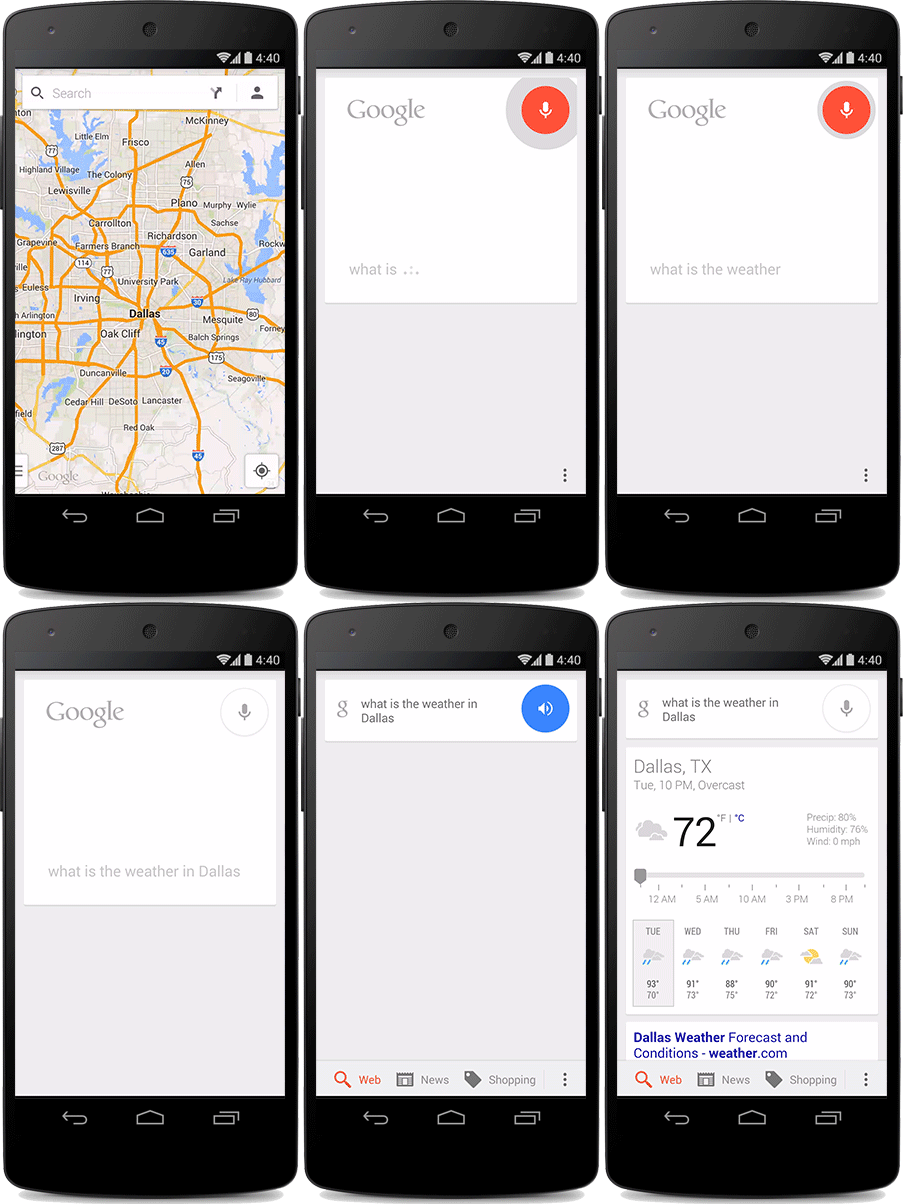
In a new update to Google Search (3.5.14), users will now be able to activate the “OK Google” hotword detection from anywhere within the OS (even the lockscreen) or even while the screen is off, providing your phone is charging.
Not enabled by default, we gave you the spiel earlier today. You’ll first need to jump into your Google Settings and select Google Settings > Search & Now > Voice > "Ok Google" Detection and check "From any screen" to enable Hotword Detection from any app (even the lockscreen). If you don’t see it immediately, don’t fret. It appears this is a new feature rolling out on a per-account basis, done on the server side of things.
What’s more is the 3.5.14 update also introduces the new ability for the app to “learn” your voice for better recognition, a feature recently removed from Search but making a return as “Google Audio History.” For those with Motorola devices, unfortunately it looks like the new system-wide hotword detection wont work on the Motorola Moto X, Motorola Moto G, or Motorola Moto E. Lame, we know.
Oh and one more thing: Google Play Services 5.0 is also rolling out (which some suspect the hotword detection may be dependent on) and adds a crazy amount of new features including Android Wear support, new Play Games features, app indexing API, closed caption support for Chromecast, new Wallet features like split tender, and more. You’ll find more info detailed on the Android Developers blog.
Should you not feel like waiting for either update to hit your device, we’ve provided a 3rd party download links below. Remember, if you don’t notice the new everywhere hotword detection, just wait for the new feature to hit your device in the coming days.
Rumors of Google killing off its Nexus line in favor of an upcoming Android Silver program have been escalating in recent months. Guess nobody told Dave Burke, the guy in charge of the Nexus program and the head of Android engineering at Google. In an interview with ReadWrite, Burke finally laid to rest those ridiculous rumors of the Nexus-line’s demise, and although he was mum on details of the Android Silver program, he made it perfectly clear Nexus wont be going anywhere.
“People have been commenting about Nexus because there is something else and they think that means the end of Nexus. That is the totally wrong conclusion to make. People just get excited by concepts and forget why we do things. We are still invested in Nexus.“
It would then appear that, while the Android Silver program could indeed be geared toward higher-end Android devices built by Google’s hardware partners and running near stock versions of Android (similar to Google Play), these devices will be offered in carrier store, with subsidized pricing. This may have something to do with the fact that nobody wants to pay $700 upfront for a Google Play edition of a phone they can get on-contract for $100. Suddenly, Samsung holding back the Galaxy S5 Google Play edition is starting to make a lot of sense.
Burke goes on to clarify Google’s reliance on actual hardware to build Android onto, and the reason we’ve seen Android development phones since the original HTC Dream. But it’s not just for Android developers, consumers too need a lower-cost, contract-free Android device, offering the purest version of Android, with updates directly from Google.
“When we are working, there are sort of two outputs. We're building a Nexus device and we're building the open source code. There is no way you can build the open source code without the phone or tablet or whatever you are building. You have to live and breathe the code you are developing.
You can't build a platform in the abstract, you have to build a device (or devices). So, I don't think can can or will ever go away. And then, I think Nexus is also interesting in that it is a way of us explaining how we think Android should run. It is a statement, almost a statement of purity in some respects. I don't see why we would ever turn away from that, it wouldn't make sense.”
So there you have it, folks. Straight form the horses mouth. And although Burke didn’t specifically say the Nexus smartphone line was here to stay (perhaps he was talking about tablets?), we think there’s a good chance of a Nexus 6 launching with Android L later this year. Now, let the rumors begin.
Whether you’re looking for tunes for your morning commute or need directions for a cross-country trip, Android Auto will deliver it all in a very seamless way. Many of the vehicles you’ll see later this year and beyond will support voice commands so you can control music playback, look up info via Google Search, and control your maps without having to remove your hands from the steering wheel.
Some of the vehicles will also have media playback controls built into the steering wheel, natch. Of course, you can always do what you need by reaching for the touch-enabled in-dash unit built into the car.
The fact that it’s powered by Google Now, Google Search and the Knowledge Graph engine means the phone can predict what you want and when you want it. For instance, if you happen to go to work at 6am every morning, the car might automatically pull up the directions to your job and some nice music to listen to on the way without you having to do anything. Or perhaps you were searching for good Italian restaurants on your computer before leaving the house — Google Now will know that, and once you get into your car it will ask you if you want to go there.
And just as with Google Now and Search on phones, Android Auto understands contextual conversations. Saying something like “take me to the football stadium” will likely pull up the local professional football stadium in your city and load up the directions without you having to do anything.
The best part is that all of it can sync with your phone and Google account. When pairing your phone up with the car, the car gets all of its information from your phone, the apps on your phone and the accounts you’re signed in with, which means there’s no clunky login processes you have to deal with. This also means getting new apps for your car is as easy as downloading an app from Google Play to your phone.
Google made it easy for developers to adapt said apps to the in-dash display, with some apps being implemented in just under two weeks according to a spokesperson we discussed with. Beyond that, the Android Auto platform gives developers the freedom to style their applications however they need (so you’ll see Spotify’s icons and green highlights within their music app, for instance).
Here are just a few of the early apps Google showed off inside Android Auto cars at Google IO this year:
MLB At Bat
iHeartRadio
Spotify
Google Play Music
Google Search and Google Now
Google Maps and Navigation
Joyride
Pocket Casts
Pandora
TuneIn Radio
Songza
Android Auto doesn’t sound amazing in this day and age, but that’s because it’s simply taking what we already have the ability to do with our phones and tablets and adapting it to a road-safe experience.
That’s all we’re asking for really, and it looks like Google has the right idea when it comes to creating a connected car experience that can do more than just play music and answer phone calls. It certainly gets us excited for 2015 and beyond. Watch the first look video from Google IO above and see if it does the same for you, and have a look at more of the sweet cars that will be equipped with Android Auto in the gallery sitting below.
As you may have heard, Google gave developers (and hardcore enthusiasts) the ability to preview Android L before its official release later this year. A little fastboot knowledge is all it took to flash the factory images to our Nexus 5 and while diving into the biggest Android update since Ice Cream Sandwich, we decided to provide you guys with a quick hands-on video.
In the video, we show off the all new lockscreen, notification drawer, settings, dialer and recents — all of which has been redesigned beautifully to Google’s new Material design standards. Check out the video below and for those that are also playing around with the preview, let us know how it’s treating you and any new discoveries you’ve made.
A hot new upgrade for Google Search is starting to roll out to the masses that will bring some very nice functionality. The “OK Google” hotword that you use to initiate a voice search within Google Now or on the home-screen of a Google Experience Launcher can now be used anywhere on the phone — even if you’re in a different app or on the lock screen.
There are a couple of caveats to note, unfortunately. For starters, not everyone is going to see the new options right away even if they are on the latest Google Search update (which should be 5.14). It’s said Google is enabling this option in waves and that you won’t be able to force the update — simply be patient and it should be delivered to you in due time.
We’re also hearing reports that the functionality requires the latest Google Play Services update, so even if you could sideload the latest Google Search APK you’d need not only the latest Google Play Services update alongside Google flipping the switch to push the new options to your phone. That’s a lot that has to happen, but patience can go a long way so hang tight and wait for all the goods to be delivered to you proper.
Yesterday Google officially gave us a close look at Android Wear and two new smartwatches. One was expected, but the other was a complete surprise. As expected the LG G Watch was on stage for demos and went on sale later in the day. Samsung also unveiled a new smartwatch, as to not be outdone by their rival, LG. The Gear Live is also available for purchase right now. Which one is better?
In terms of specs these devices are very similar. Both have rectangular displays; the G Watch is ever so slightly bigger, but the Gear Live has better resolution. Powering these devices are 1.2GHz processors and 512MB of RAM. Battery is a big concern with these devices since the display is on at all times. The G Watch edges out the Gear Live’s 300mAh battery with a 400mAh juice pack.
Size is another concern for these devices. A smartwatch is on your wrist at all times; you don’t want it to be too bulky or heavy. The Gear Live is a full millimeter thinner and 4 grams lighter. However, it’s also slightly taller which could make it seem bigger on your wrist. The other things to consider when comparing these devices is the overall design.
The G Watch is completely black and plastic. If someone was tasked with designing the most generic smartwatch on the planet they would come up with the LG G Watch. The Gear Live is nothing special either. Samsung clearly re-used their design for the latest Gear smartwatches It has more character than the G Watch, but it also has that cheap Samsung feel to it. The choice depends on your personal taste.
The last thing we have to compare is price. The LG G Watch is available for $230 while the Samsung Gear Live is $200. What it really comes down to is which one you think looks nicer. The specs are very similar, and $30 difference in price is not major. Which smartwatch will you choose? Are you waiting for the Moto 360? Tell us why you’re choosing the G Watch or Gear Live! be sure to visit the forums to discuss either your G Watch or Gear Live with other users!
Say goodbye to Google TV and hello to the wonder you see us groping in the video above. Android TV is a renaissance of Google’s first stab at the smart TV market. While we won’t be seeing any consumer products until we head closer to the end of this year, developers have already been treated to units of the ADT-1, Android TV’s first development platform device.
Specs
One of the things early Google TV devices were chastised for was under-performing specs. The lackluster internals made for sluggish experiences (so much so that some of them became flat-out unusable after a while). Thankfully Google has looked to remedy that as they came out the gate strong with some pretty impressive specs:
Tegra 4 chipset
2GB of RAM
16GB of internal storage
2×2 MIMO dual-channel WiFi
Bluetooth 4.0
Ethernet Port
HDMI port
Android L Developer Preview
The device is fully unlocked out of the box, natch, so Google’s inviting developers to go nuts and come up with anything they can to help get this platform ready for launch later this year. It’s far too early to tell what the result of such openness will be, but we have a feeling it won’t take long for developers to pour their heart, soul and code into these boxes.
Software and Features
Android TV appears to be quite simple at its core. It takes on a lot of the same qualities Google TV had: it combines live television with internet video sources such as Netflix, Hulu and YouTube to give you access to nearly anything you’d want to watch at a moment’s notice.
All of that will leverage voice commands, search and Google’s Knowledge Graph to help you find what you are looking for and learn everything about it with ease. Not lost on us is the much improved user interface that presents all your content in a way that’s very pleasing to the eye, and it’s easy enough to zip around said interface thanks to the capable hardware sitting inside.
Where Android TV steps things up a notch — nay, a ton — is the department of games. One of the important things they wanted to do from the starting gate was build games into the platform in a way that developers won’t even have to think about porting their wares over to the big screen.
This includes integration with the Google Play Games platform for access to achievements, leaderboards and multiplayer gaming. We saw examples of gaming with controllers to give folks a console-esque experience, and with that powerful Tegra 4 chipset inside this could turn out to be a very versatile piece of equipment.
Google also mentioned that the platform would have “Cast” capabilities, so the ability to beam music, movies, photos and even mirror your Android phone or tablet’s display should add a lot to the experience. Needless to say this should prove to be a much more useful, usable and exciting package than Google TV was in its infancy, and it’ll be exciting to see what future iterations bring us.
Photos
In case you were wondering how the ADT-1 and its controller looks from every angle this handy photo gallery should do the trick:
Will you buy one?
So after Google’s second (and seemingly successful) attempt at the smart TV game — will you buy one? Granted, you won’t be able to get the ADT-1, but we should see manufacturers start to push out set-top boxes and televisions with Android TV built-in by this holiday season. Let us know your thoughts in the comments below!
Android Auto might not be a very exciting platform for vehicles, but with time it should blossom into something very interesting. Wondering which automobile manufacturers would be looking to bring their first Android Auto-equipped wheels?
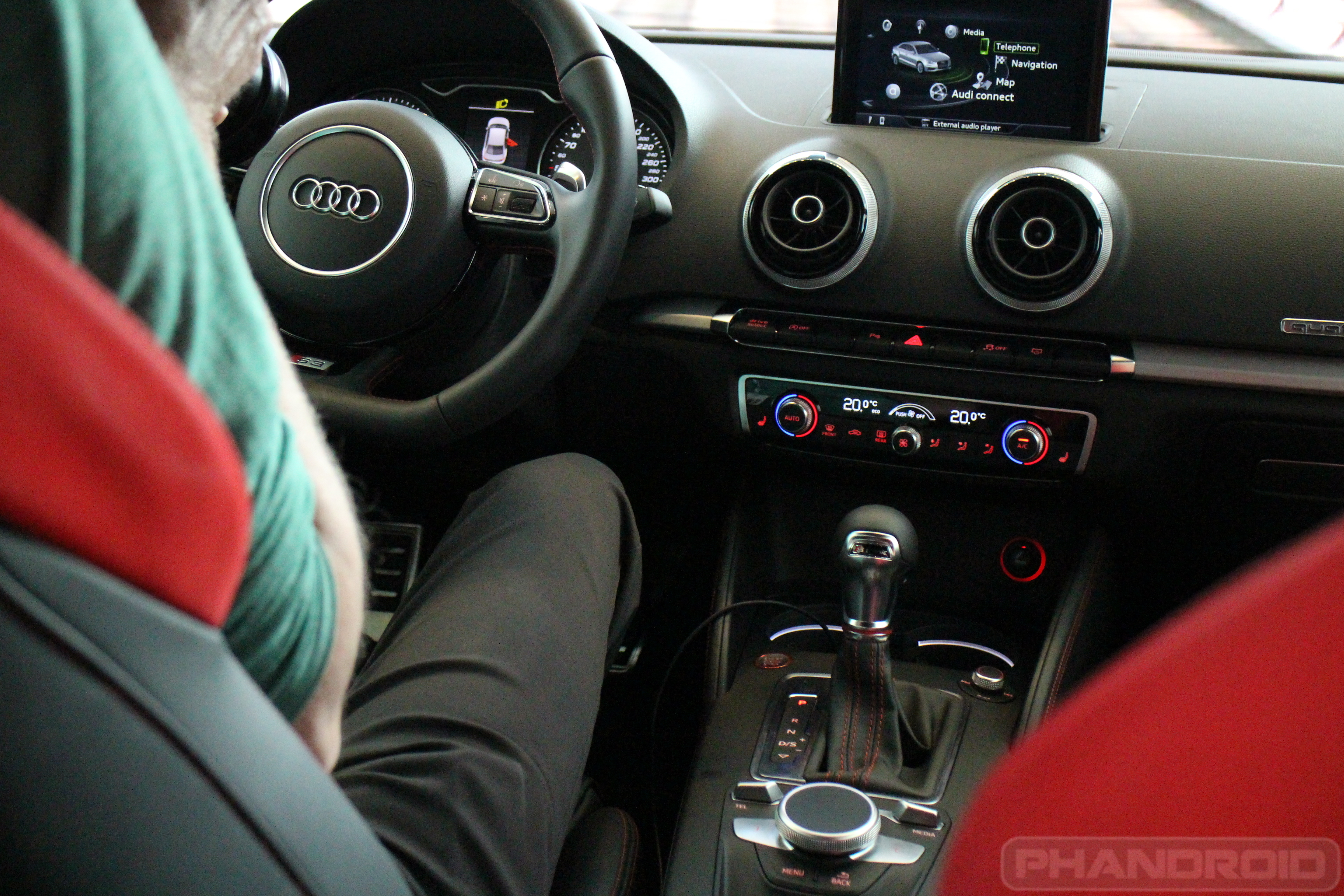
Volvo and Audi have both confirmed plans to bring vehicles with the platform pre-installed later this year. For Volvo, they say all their newest vehicles based on their Scalable Product Architecture will be equipped with Android Auto. The first vehicle to kick that off is the Volvo XC90 which they’ll be unveiling at the Paris Motor Show later this year.
Audi didn’t exactly give us as much info as to which of their first cars would be tricked out with Android Auto, though they did tell us that we’ll be seeing goods from them in early 2015.
Android Auto provides a car-friendly user interface for accessing Google Maps and Places, Search, Google Play Music and more apps that help make your life on the road easier. The platform easily hooks into a car’s media controls (if applicable), so you’ll be able to do everything you need using the buttons on your steering wheel, the in-dash display or even just using your voice.
Android Auto isn’t something that’s going to revolutionize the automobile, but it is one of the first open platforms for smart car functions that we’ve seen, and it’s that openness that’s going to help Google get their platform into tons more cars going forward. There will be no shortage of manufacturers, either, with over 40 different partners forming up the initial group of the Open Automotive Alliance. Needless to say we should be hearing a lot more from many more manufacturers before the year is out.
And just like that, Google has officially released the factory images for both the Nexus 5 and Nexus 7 2013 (WiFi). For those with knowledge in these things, these factory images can be flashed to your device where you’ll be running the Android L Developer Preview in no time. Download links provided at the source below. Have fun!
If there is a theme for day 2 of I/O it’s “crazy stuff becoming real.” Earlier today a Project Ara device was powered on for the first time, and just a little bit later Project Tango got a manufacturer. Project Tango is the tablets and smartphones equipped with cameras that allow them to see the world in 3D. Tango devices have been showed off in prototypes before, but now Google has announced a hardware partner and consumer release plan.
Google is partnering with LG to build a consumer version of the Project Tango tablet. It will go on sale sometime next year. The question now becomes “what will consumers do with this technology?” Project lead Johnny Lee said “imagine if the directions to your destination didn’t stop at the front door, but to tell you exactly where to go and what to do.” Another demo showed off mapping a home to play virtual realty games.
Right now this is still just a very early project, but next year it will become a reality. Are you interested in having a device with this technology?
Follow along with the Day 2 live stream right here.
If you’re looking for a place to talk about Google’s first batch of Android Wear smartwatches — including the LG G Watch, the Motorola Moto 360 and the newly-announced Samsung Gear Live — look no further. We have sections for the LG G Watch and Moto 360 already chock full of healthy discussion at AndroidForums.com, and the shiny new Samsung Gear Live section is live for those of you interested in that piece of wrist-bound tech.
Here are just a few choice threads you might want to dig into once you make your way over there:
As promised, Google has officially made both the Android L preview and Android Wear SDKs available to developers. The necessary files are now available via the Android SDK Manger, and should give developers all the tools they need to start building apps for Android L and Android Wear.
Keep in mind that for us normal folk, there isn’t much here. We anticipate the Android L preview factory images will be released very soon for the Nexus 5 and Nexus 7 (WiFi), so hang tight. Ah, feels like Christmas morning, doesn’t it?
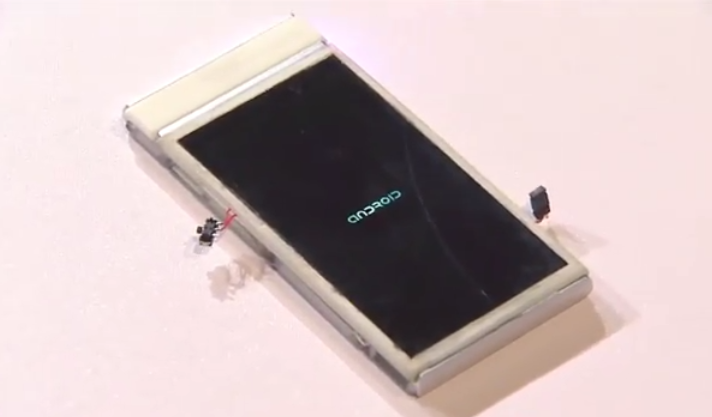
It’s alive. Just a few months ago we saw the first prototypes of Google’s Project Ara modular devices. Fast forward to today at I/O and the ambitious project is already working with real devices. Paul Eremenko, the lead for Project Ara, actually powered on a modular phone for the first time in public.
Unfortunately there are still a lot of bugs with Project Ara. They were able to get to the boot screen, but after that it consistently froze. It’s not the most successful demo, but it shows that they are making process. To make things even more exciting Eremenko issued a challenge to developers. For anyone that creates a working module that lets a phone do something “a phone has never done before” they will receive a $100,000 prize.
That may sound like an impossible thing to do, but Project Ara is all about doing the impossible. A modular phone has never been done before, but yet today we saw one power on for the first time. This could be one of Google’s most exciting projects. We can’t wait to see how it grows.
Follow along with the Day 2 live stream right here.
One of the many things Google talked about yesterday was Android Wear. They gave us a demo of the software, and announced two smartwatches that can be purchased right now. One thing that they didn’t talk a lot about is what devices are compatible with Android Wear. Luckily there is a very simple way to check if your phone will work with a Wear device.
The site will detect your phone and let you know if it’s compatible. If you get the nice big green check marks, like on the Nexus 5 above, you are good to go. Here’s a little cheat if you don’t feel like checking a website: Android Wear only works with devices running Android 4.3 or higher. Most newer devices will be fine, but if your phone is a little on the older end it may not. iPhones are also not compatible.
So, did your phone make the cut? Are you getting an Android Wear device?
You are subscribed to email updates from Phandroid To stop receiving these emails, you may unsubscribe now.